Use this reference to see how invoice status, Receive to routing, line income accounts, payments, and voids affect receivables and the general ledger.
Quick reference
| Invoice State Or Action | Ledger Effect | Where It Matters |
|---|---|---|
Draft invoice |
No journal entry is posted | Invoice review before opening |
Open invoice with Accounts Receivable in Receive to |
Debits the receivable account for the total, credits line income accounts for the subtotal, and credits Sales Tax Payable when tax applies | Open AR, aging, tax liability, and payment follow-up |
Paid-now invoice with a settlement account in Receive to |
Debits the settlement account for the total, credits line income accounts for the subtotal, and credits Sales Tax Payable when tax applies | Sales recorded as paid immediately |
Receive payment |
Debits Deposit to and credits the receivable account carried by the open invoice |
Customer payment and bank review |
| Payment equals remaining balance | Invoice becomes Paid |
AR status and aging |
| Payment is less than remaining balance | Invoice becomes Partial |
Collection follow-up |
| Payment is greater than remaining balance | Payment is blocked | Overpayment review |
Void invoice |
Posts a reversal, moves the invoice to Void, zeroes the balance, and preserves audit details |
Source-document correction |
| Customer terms and due dates | No posting by themselves | Aging and collection review |
| Customer credit settings | Setup and review signal only | Customer review before invoicing |
Default income account |
Fills blank line income accounts where supported | Line review before posting |
Line Income account |
Controls the revenue side of the posting | Invoice creation and import |
Sales tax payable account |
Holds collected sales tax as a liability until it is remitted | Taxed Open and paid-now invoices |
Details
Use Open when you want SPRK to post the invoice through the selected Receive to route instead of keeping it unposted as a draft. Use an Accounts Receivable control account in Receive to when the invoice should remain open until payment is recorded. Use a cash, bank, or credit-card settlement account only when the invoice is being recorded as paid immediately.
Customer terms, customer credit settings, company invoice defaults, and item defaults affect setup and follow-up, but they do not replace routing and line-account review. Their main downstream effect is on invoice terms, due-date defaults, starting workflow status, data consistency, and receivables aging review.
When sales tax applies, revenue is the invoice subtotal. The tax amount is credited separately to the invoice’s Sales tax payable account. A taxed draft can remain incomplete, but SPRK requires an active liability account before the invoice can post. Older posted invoices created before this safeguard are not rewritten automatically; review any needed correction with your accountant and record it as a separate, supported adjustment.
Aging can show invoice-level terms for the invoice. If an invoice does not carry its own terms, aging can fall back to the customer default terms.
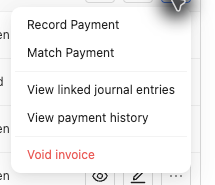
Do not confirm a void in a live company until active payments and reversal consequences have been reviewed.
If something looks wrong
| What You See | What To Check | What To Do Next |
|---|---|---|
An invoice was marked Paid by editing status |
Whether payment was recorded through Receive payment |
Use the payment workflow so posting and balance update together |
| The invoice stayed open when it should have been paid-now | Receive to routing |
Use a settlement account only when paid-now is intended |
| Revenue posted to the wrong account | Line-level Income account values |
Correct line accounts before posting or use a supported correction path |
| Customer terms look correct but posting is wrong | Receive to and line accounts |
Treat terms as timing data, not posting routing |
| Sales tax posted to an unexpected liability account | The invoice’s Sales tax payable account |
Review the saved invoice and use a posted correction path if its accounting entry must change |
| Void is needed but payments exist | Payment history and linked journal entries | Reverse the payment journal and confirm the payment-application reversal before voiding the invoice |
Practice and examples
- Practice file: invoice-void-reversal.csv