
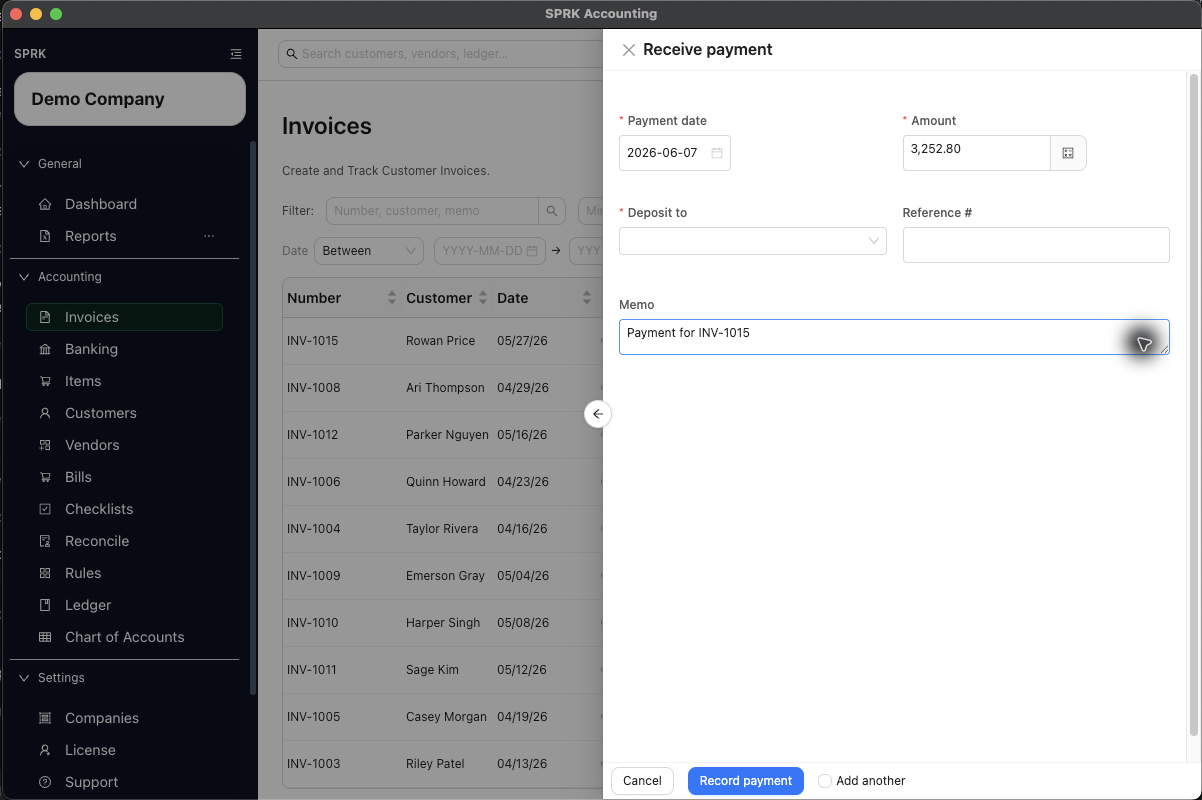
Record a customer payment so SPRK reduces the amount owed and updates the invoice status. Payment history and linked entries remain available for later review.
When to use this
Use this guide when a customer has paid an invoice and you want SPRK to reduce the receivable and update the invoice status correctly.
Before you start
- The invoice already exists.
- The invoice is not already fully paid.
- A deposit account is available in the
Deposit toselector. - Your company has a default Accounts Receivable account configured for receivables workflows.
- The invoice is in an active receivables state such as
OpenorPartial.
Steps
- Open
Invoices. - Find the invoice you want to collect against.
- Open
Morefor that invoice and selectRecord Payment. - In
Receive payment, complete:Payment dateAmountDeposit toReference #, if neededMemo
- If the account is missing, use the add-account option from
Deposit towhen it is available.- Create only the bank, cash, or credit-card settlement account you actually want for this payment.
- Inline account creation adds an account choice; it does not record the payment until you save the payment workflow.
- Select
Record payment. - If the payment is less than or different from the remaining balance, review the confirmation prompt before you continue.
- Return to the invoice list and confirm the updated
BalanceandStatus. - If you need collection follow-up for other invoices from the same customer, return to that customer record or aging report after the payment is recorded.
- To review later, use the invoice row action menu for
View payment historyorView linked journal entries.
Banking Match Path
When the customer payment first appears as a pending money-in row in Banking, use Match bank transaction when available. SPRK can suggest open invoices, show the candidate number, customer, dates, open amount, bank amount, and difference, then use Receive Payment & Confirm or Receive Partial & Confirm when the bank amount is eligible. Overpayments are not actionable from that Banking match path.
What happens next
SPRK records the payment, reduces the invoice balance, and updates the status:
- fully paid invoices become
Paid - partially paid invoices become
Partial
Customer payment terms and credit settings can help you review receivables before collection, but they do not replace this payment workflow.
- Recording a payment reduces Accounts Receivable and increases the selected deposit account according to the invoice payment workflow.
- Creating a
Deposit toaccount inline only changes the available settlement-account choices. The payment itself is posted only when you record it. - Reversing a payment-linked journal through a supported source-document confirmation can deactivate the payment application and reopen the invoice balance.
If something looks wrong
| What You See | What To Check | What To Do Next |
|---|---|---|
| The invoice status was changed without a payment | Whether a payment entry exists in View payment history |
Use More > Record Payment; do not type Paid as a substitute for recording cash |
| No payment has been recorded | Whether you only set customer credit or invoice terms | Open More > Record Payment; terms and credit settings do not collect cash |
| The new settlement account exists, but the invoice balance did not change | Whether you selected Record payment after creating the account |
Return to Receive payment, choose Deposit to, and record the payment |
Record Payment is unavailable |
Whether the invoice is already paid or has no remaining balance | Review View payment history before attempting a correction |
| The same receipt appears to have been recorded twice | Whether you recorded it here and again from a pending Banking row | Stop and review payment history and linked journals before reversing the duplicate |
Practice and examples
Use the practice file and screenshots to compare recording a payment, matching a bank deposit, and reviewing payment history after the invoice balance changes.
- Practice file: bank-deposit-invoice-match.csv


Payment history and linked journals are review surfaces, not edit screens. The invoice action menu keeps payment review close to the source document.