
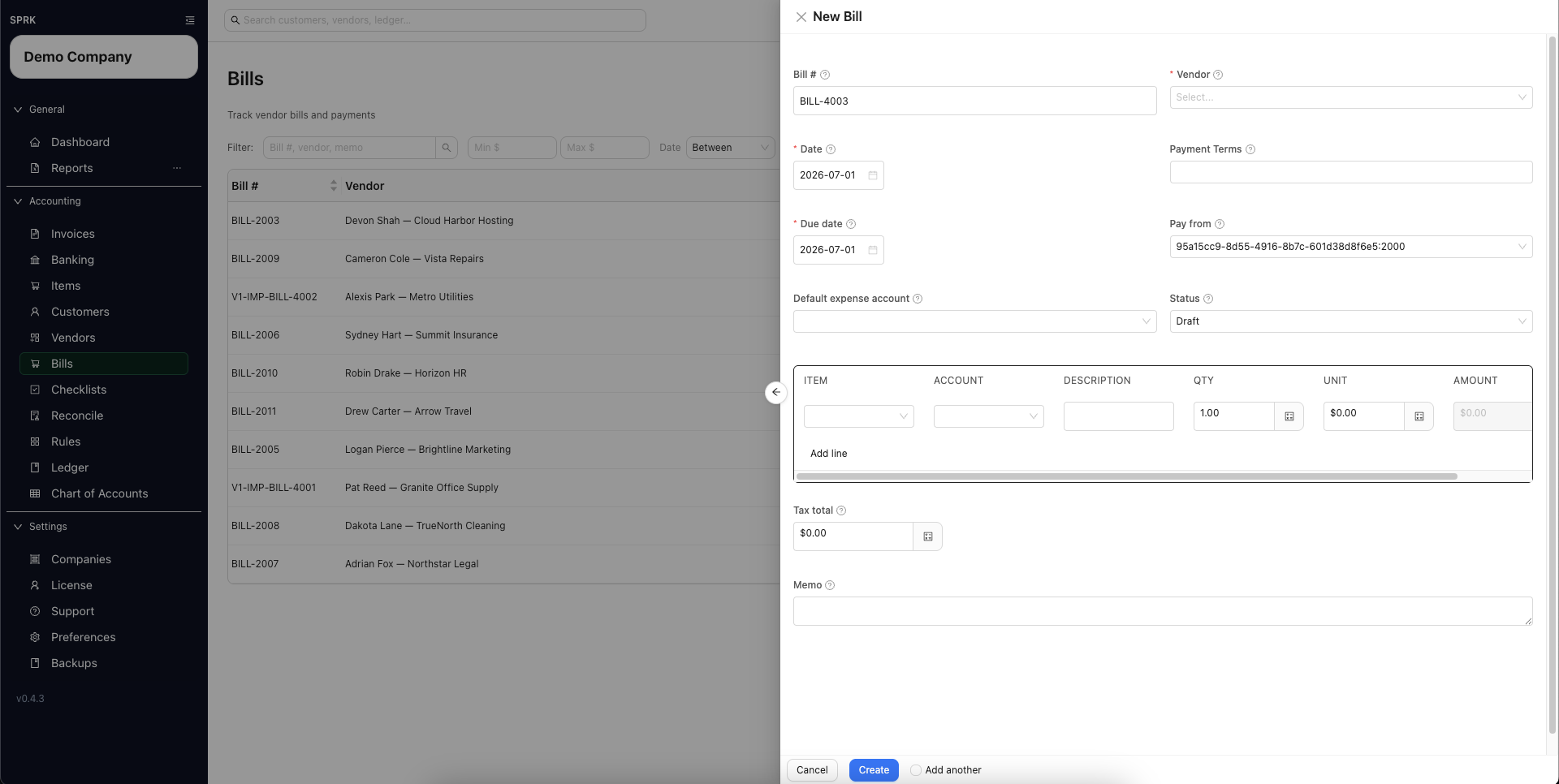
Enter a vendor bill and choose whether it should stay open or be recorded as paid now.
When to use this
- You need to enter a vendor bill.
- You need the bill to stay in
Draft, move toOpen, or be recorded as paid immediately. - You need to review vendor, due date,
Pay from, and line accounts before saving.
Before you start
- A vendor record exists.
- The expense or other posting accounts for the bill lines are available.
- You know whether
Pay fromshould use an Accounts Payable control account or a cash, bank, or credit-card settlement account. - If you plan to record payment later, the cash or bank account you want to pay from is available.
Steps
- Open
Bills. - Select
New. - Complete the bill header:
Bill #VendorPay fromDefault expense accountDateDue dateStatusTerms, if needed
- Choose
Pay fromcarefully:- Use an Accounts Payable control account when you will pay the vendor later.
- Use a cash, bank, or credit-card settlement account only when the bill is being recorded as paid immediately.
- These are two different choices: open payable or paid now.
- Add one or more bill lines.
- For each line, choose the
Accountthat should receive the expense or other debit.Default expense accountfills blank line accounts when the drawer supports that fallback.- The line-level
Accountis the posting source for that line.
- Complete the line description, quantity, unit cost, and review the calculated amount.
- Add
Tax totalorMemoif needed. - Decide how the bill should be saved:
Draftstores the bill without posting Accounts Payable.Openstores the bill and posts the payable whenPay fromis an Accounts Payable control account.- Choosing a settlement account in
Pay fromcan route the bill through the paid-now path instead of leaving an open payable.
- Save the bill.
- Review the bill list to confirm the expected
Status,Total, andBalance.
What Happens When You Save
- Saving a bill as
Draftdoes not post a journal entry. - Saving a bill as
Open, or updating a bill from a non-open status toOpen, posts the bill recognition entry whenPay fromis an Accounts Payable control account. - Saving a paid-now bill with a cash, bank, or credit-card settlement account in
Pay fromposts directly between the bill line accounts and that settlement account. - Line-level
Accountvalues control the expense or debit side of the bill posting.
If something looks wrong
| What You See | What To Check | What To Do Next |
|---|---|---|
The bill stayed in Draft |
Whether Status was set to Draft before saving |
Edit the bill and choose the intended workflow status before saving again |
| The bill did not stay open as a payable | Whether Pay from used a settlement account instead of an Accounts Payable control account |
Use the payables route when the vendor is still owed |
| The bill posts to the wrong expense account | Line-level Account values |
Correct line accounts before saving or use a posted correction path if already posted |
| Vendor defaults seem to have chosen the account | The bill line accounts | Review every line account before opening the bill |
| A posted-save prompt appears | Whether the bill has already posted | Review the posted-save strategy before changing the bill |