
Use SPRK’s Schedule C report to review income and expense accounts grouped into Schedule C lines before tax preparation.
When to use this
Use this report when you want a Schedule C-oriented review of posted activity. It is a review aid for your accountant or tax preparer; it does not file a tax return.
Steps
- Open
Reportsand selectTax Forms. If the tab is not visible, use the tab overflow menu. - Choose
Periodand review theRange. - In
Tax Form, keepSchedule Cselected. - Select
Run. - Review the income, expense, and
Unclassifiedsections. An amount inUnclassifiedneeds account-mapping review before you rely on the report.
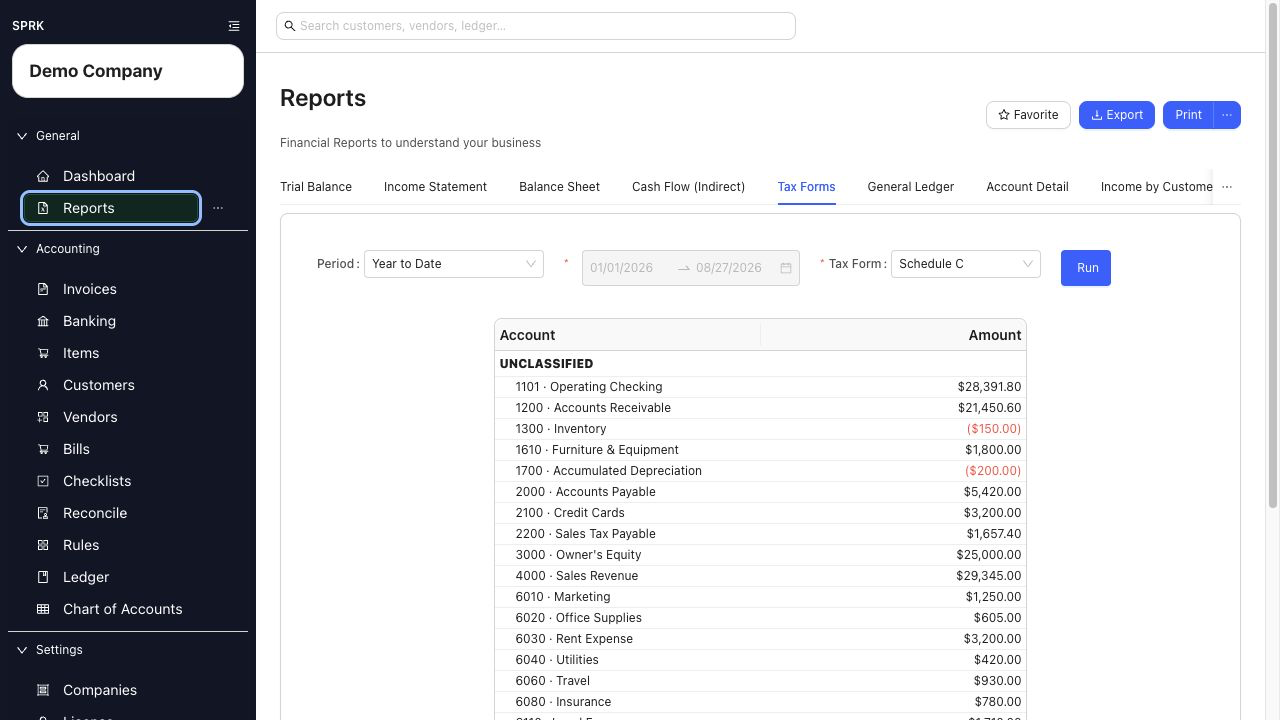
- Use supported report rows to inspect the posted activity behind an amount.
- Use
ExportorPrintwhen you need a working copy for review.
What happens next
Correct an account or transaction from its original page, then run the report again. This report supports review; it does not file or submit Schedule C.
If something looks wrong
| What You See | What To Check | What To Do Next |
|---|---|---|
| Expected activity is missing | Active company, date range, and whether the transaction is posted | Correct the filter or finish the source transaction before rerunning |
Amounts appear in Unclassified |
Schedule C mapping on the underlying accounts | Review the account setup with your accountant before tax preparation |
| The report does not match a filed return | Whether later tax adjustments were made outside SPRK | Reconcile the difference with your tax preparer’s final workpapers |