
Review posted income by customer, then open account and invoice detail when you need to explain a balance.
When to use this
Use Income by Customer to compare customer contribution, investigate an income amount, or support customer-level review for a selected period.
Steps
- Open
Reportsand selectIncome by Customer. If the tab is not visible, use the tab overflow menu. - Choose
Periodand review theRange. - Leave
Customerblank for all customers, or choose one customer. - Keep
Detailselected when you want document-level rows. - Select
Run. - Review each customer total and the income accounts underneath it.
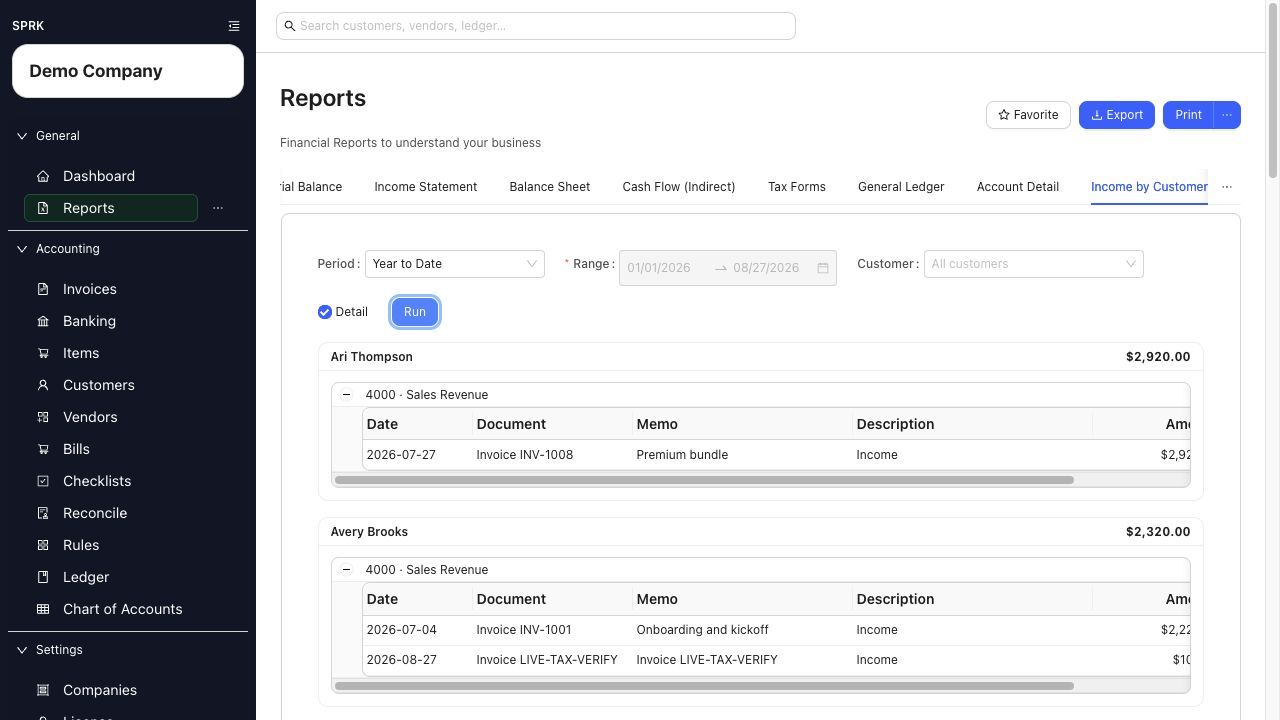
- Select an amount to open its register detail. In detailed results, select an invoice number to review the invoice information or use
Viewto open the linked journal entry. - Use
ExportorPrintwhen you need a working copy.
What happens next
The report uses posted income activity and its customer or invoice links. Correct a customer or invoice issue from its source page, then run the report again.
If something looks wrong
| What You See | What To Check | What To Do Next |
|---|---|---|
| A customer is missing | Date range, customer filter, and whether posted income carries that customer link | Clear the filter and inspect the source invoice or journal detail |
| A total differs from an invoice list | Whether you are comparing posted income with invoice balances or payment status | Use the linked journal detail to identify what the report includes |
No income activity appears |
Active company, selected range, and customer filter | Adjust those filters, then run again |