
Move journal-entry data into or out of SPRK from the Ledger page, with an accountant review path for templates, account matching, preview totals, and post-import report checks.
When to use this
Use this article when you need to import journal-entry activity into SPRK, export journal-entry data for review outside the app, or prepare ledger data for migration cleanup.
Before you start
- An active company is selected.
- For imports, you have a source file in
.csvor.xlsxformat that matches the ledger workflow you intend to use. - You understand which existing accounts should receive imported lines.
Accountant Review Sequence
- Confirm the active company.
- Confirm the import belongs in
Ledger, notBanking, invoices, bills, checks, or payments. - Download the current template if you are preparing a spreadsheet.
- Match account labels to the accounts you intend to use.
- Check that each journal entry balances before upload.
- Preview the file in SPRK.
- Compare preview totals and dates to the source file.
- Confirm only when the preview matches your accounting intent.
- Run
Trial BalanceorGeneral Ledgerafter import to review the posted result.
Steps
- Open
Ledger. - Choose the action that matches your goal:
Exportto download the currently filtered journal-entry data.Importto open the current starter modal before you pick a file.
- In the current
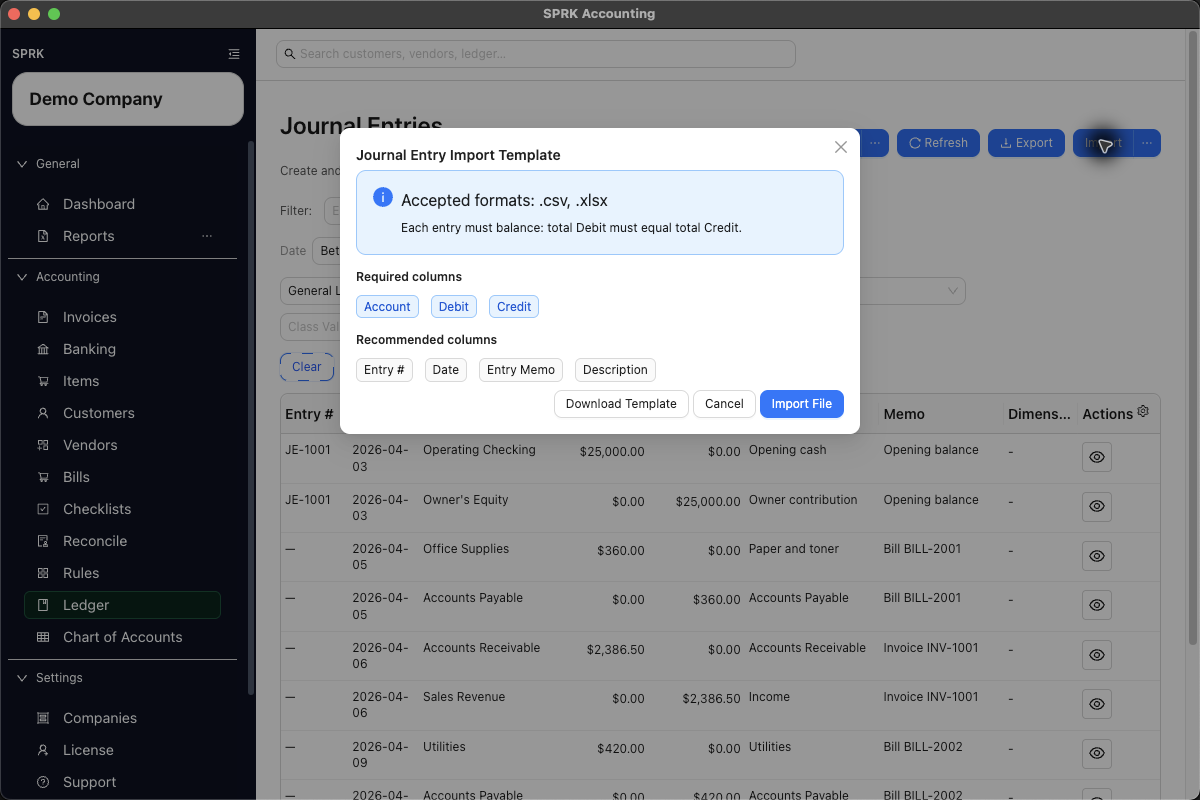
Importstart modal, review the template guidance before continuing:- accepted formats are
.csvand.xlsx - visible template columns include
Entry #,Date,Entry Memo,Account,Description,Debit, andCredit - required columns are
Account,Debit, andCredit - recommended columns include
Entry #,Date,Entry Memo, andDescription Download Templategives you the starter file before uploadImport Filecontinues to file selection after you review the requirements
- accepted formats are
- For exports, review your current filters first because the export uses the rows visible in the ledger view.
- For imports, select your file and review the server-generated preview before confirming.
- Review preview columns and diagnostics. The current import path can surface entry number, date, entry memo, account, resolved account ID, description, debit, credit, and vendor information when those fields are present and resolved.
- Match
Accountlabels to the accounts you intend to use.- Account labels can resolve from readable code-plus-name labels as well as direct account IDs, but unknown accounts still block posting.
- If a source row omits
Date, review the previewed date before confirming. The current import path can fill a default run-date value instead of failing immediately for a blank date. - If SPRK detects missing account labels during import, resolve or create the accounts through the import flow, then let SPRK re-preview the same file before commit.
- Confirm the import only after you have reviewed the preview totals, dates, descriptions, accounts, vendors, and validation messages.
- After import completes, refresh the ledger if needed and review the newly created entries.
What happens next
You can move journal-entry data in or out of the product with the current supported tools.
- Export creates a download file only. It does not create, edit, or reverse any ledger entries.
- Previewing a ledger import does not post.
- A valid confirmed ledger import commits as a batch. Do not treat previewed rows as partially posted unless the app confirms the batch.
- Import can create new accounts during account-resolution steps before the journal entries are posted, but those account creations do not affect balances on their own.
- Import is blocked when the file has validation errors, no usable journal lines, unresolved or ambiguous account labels, invalid vendors, out-of-balance entries, duplicate-batch conflicts, posting-cutoff conflicts, or other journal validation failures.
- Preview failures remain visible in the import modal, and confirmation stays blocked until SPRK has a valid preview.
- If the same completed batch is retried, SPRK can return the existing journal entries instead of creating duplicates; if only part of a prior batch exists, the retry should be blocked rather than posting the remainder.
If something looks wrong
| What You See | What To Check | What To Do Next |
|---|---|---|
| The result does not match the intended workflow | Ignoring a blank source date just because the preview filled one | Confirm the defaulted date belongs in the intended posting period |