
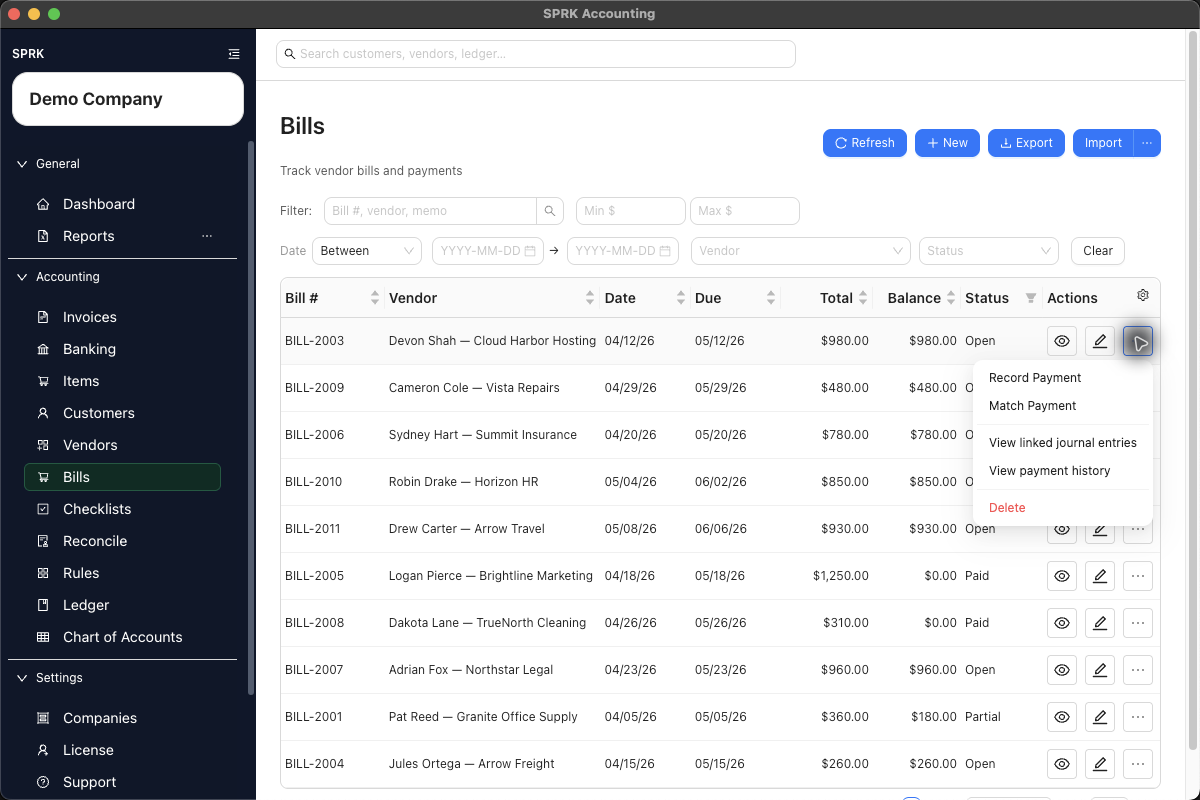
Record payments against open vendor bills and review payment history after the bill balance changes.
When to use this
- An open bill is ready to be paid.
- You need to record a full or partial payment.
- You need to review bill payment history or linked journals after payment.
Before you start
- Confirm the active company.
- Confirm the bill is open or partial and has a remaining balance.
- Confirm the
Paid fromaccount is available. - If the payment first appeared in Banking, decide whether the bank row should be matched instead of manually recording a second payment.
Steps
- Open
Bills. - Find the bill.
- Review the bill status, total, balance, vendor, and due date.
- Open
Morefor the bill and selectRecord Payment. - In
Record payment, complete:Payment dateAmountPaid fromReference #, if neededMemo
- Record the payment.
- Confirm the updated balance and status in the bill list.
- Use
View payment historyorView linked journal entrieswhen you need later review.
What Happens When You Record Payment
Recording a bill payment posts a separate payment entry. SPRK debits the payable account carried by the open bill and credits the selected Paid from account. Full payment changes the bill to Paid; a smaller payment leaves the bill as Partial.
If something looks wrong
| What You See | What To Check | What To Do Next |
|---|---|---|
| The payment amount is larger than expected | Bill balance and payment amount | Correct the amount before recording |
| The wrong account will be credited | Paid from |
Choose the correct cash, bank, or credit-card account |
| A bank withdrawal already exists | Whether the payment should be matched from Banking | Use the bank match path instead of recording a duplicate payment |
| The bill still shows a balance | Whether the payment was partial | Review payment history and record additional payment only if needed |
| Payment history looks like an edit screen | Whether you are trying to correct payment activity | Use the supported correction action instead of editing history directly |