
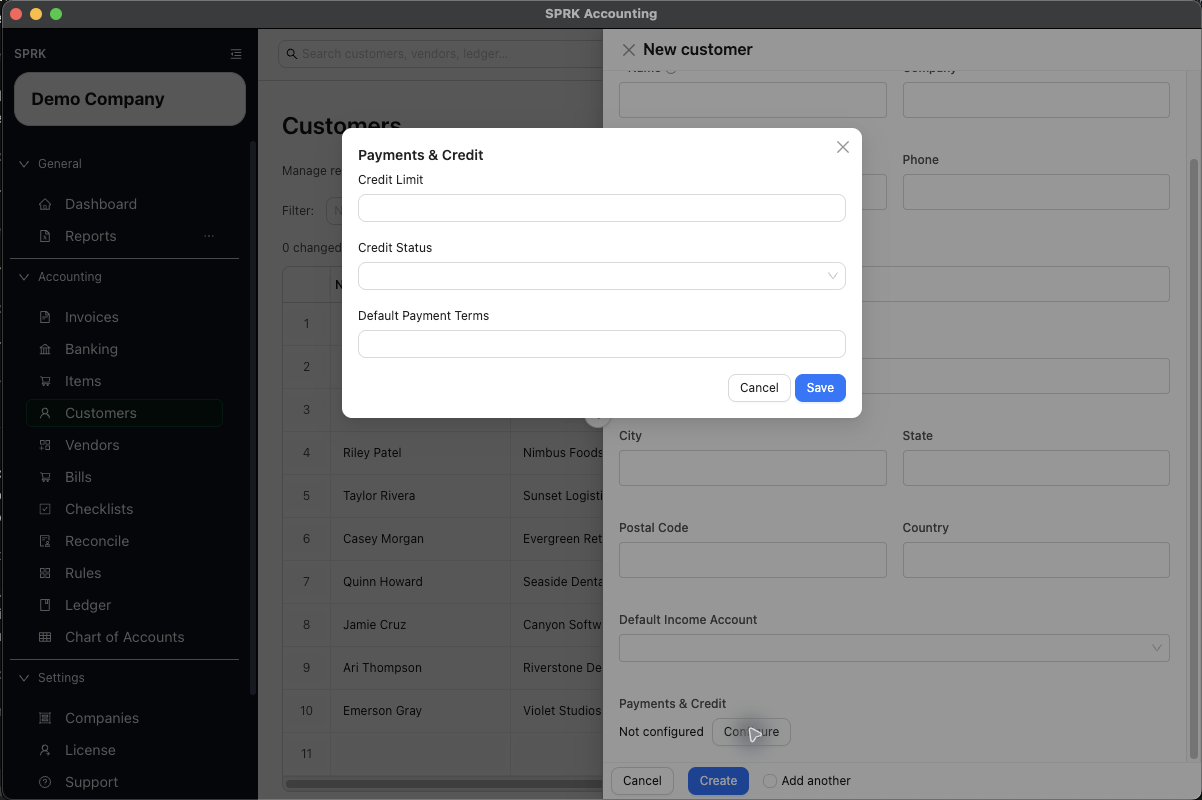
Set customer-level payment and credit defaults before invoicing so due dates, receivables follow-up, and internal review expectations stay more consistent.
When to use this
Use this page when you want a customer record to carry standard payment terms, a visible credit review status, or a credit limit before your team starts creating invoices.
When to use this Setup
- Set customer terms when most invoices for the customer should start from the same due-date pattern.
- Use company
Invoice defaultswhen most new invoices across the company should start from the same terms before customer-specific setup is applied. - Set a credit status when your team needs a visible reminder to pause, review, or use a stricter collection approach before opening invoices.
- Set a credit limit when you want the customer record to show a reference amount for receivables review and follow-up.
Before you start
- You can open
Customers. - The customer record already exists, or you are ready to create it.
- You know whether the customer should use standard terms such as
Net 15,Net 30, orDue on receipt.
Steps
- Open
Customers. - Create a new customer or edit an existing one.
- In the customer drawer, review the core customer details first so the record is easy to identify later.
- Open
Payments & Credit. - Review
Termsfirst:- Use this field when the customer usually follows the same payment window.
- SPRK can use the saved customer terms to fill invoice
Payment Terms. - When invoice terms fill automatically, SPRK can also calculate a starting
Due Datefrom the invoice date.
- Review
Credit statusnext:- Choose the status that best matches how your team wants to review future invoices.
- Common visible options include
Approved,Credit Hold,Cash Only,On Hold, andReview Required.
- Review
Credit limitif you want the customer record to show a reference amount for receivables review. - Save the customer.
- When creating an invoice later, review the filled
Payment TermsandDue Dateinstead of assuming they are always correct for that specific job. - Use the customer row action for
AR Agingwhen you need to review open balances, terms, and overdue timing for that customer after invoices are posted.
What happens next
The customer record keeps payment and credit defaults together, new invoices can start with the customer’s payment terms already filled in, and receivables follow-up stays easier to review by customer.
Downstream Effects
- Customer terms can prefill invoice
Payment Termsand help SPRK calculate a due date from the invoice date. - Company-level
Default invoice payment termscan seed invoices that do not already have a customer or invoice-specific terms value. - Common terms such as
Due on receipt,Due upon receipt,EOM,x/y net N, andNet Ncan calculate due dates. Review unusual freeform terms manually. - Invoice-level terms still need review because a one-off invoice may need a different due date than the customer default.
- If an invoice has its own terms, receivables aging can show the invoice-specific terms for that invoice instead of falling back to the customer default.
- Receivables aging can show terms and overdue timing alongside the customer balance, which helps with collection follow-up.
- Recording a payment is still a separate workflow. Changing terms or credit settings does not reduce an invoice balance.