
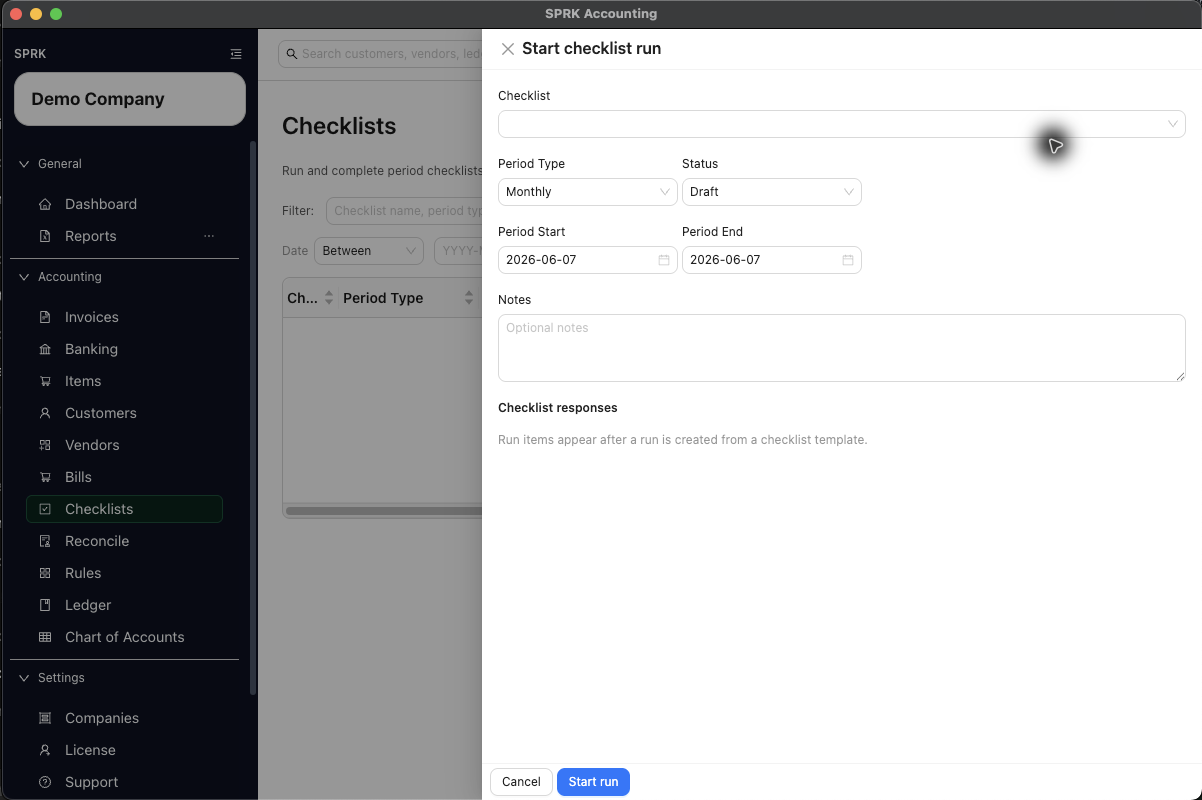
Start a checklist run for a defined period, capture responses on each checklist item, and complete the run when the work is actually finished.
When to use this
Use this guide when you want to start and complete a checklist run for daily, weekly, monthly, quarterly, yearly, or custom close-style work.
Before you start
- An active company is selected.
- At least one active checklist template exists.
- You know the period dates the run should cover.
Steps
- Open
Checklist. - Select
New. - In
Start checklist run, choose theChecklisttemplate you want to use. - Set the run details:
Period Type:Daily,Weekly,Monthly,Quarterly,Yearly, orCustomStatus: usually start withDraftorIn ProgressPeriod StartPeriod End- Optional
Notes
- Select
Start run. - Open the created run from the main checklist table if it does not stay open automatically.
- Complete each checklist response item:
- Enter text for text fields.
- Choose
YesorNofor boolean items. - Pick a date for date items.
- Add optional item notes when the task needs supporting context.
- Update the run as work progresses:
- Use
Save runto keep in-progress changes. - Use
Complete runonly when the checklist work is actually finished.
- Use
- Reopen the run later if you need to review or edit it before completion.
What happens next
You have a dated checklist run tied to a specific period and template, with stored responses and a visible status.
- Starting a checklist run creates a checklist-run record only.
- Saving responses updates checklist-run fields only.
- Completing the run changes its status to
Completed. Complete any accounting task from the page linked in that checklist item. - If one of the checklist items tells you to post an entry elsewhere in SPRK, that posting must still happen in the separate source workflow.