
Review how SPRK organizes accounts by code, parent-child hierarchy, type, subtype, posting role, control-account role, and active status so you can maintain a usable account list without changing posted balances.
When to use this
Use this article when you need to understand how accounts are grouped, created, edited, imported, exported, or deactivated in the Chart of Accounts page.
Before you start
- An active company is selected.
- You know whether you are adding a brand-new account, reorganizing an existing one, or reviewing the current structure.
Steps
- Open
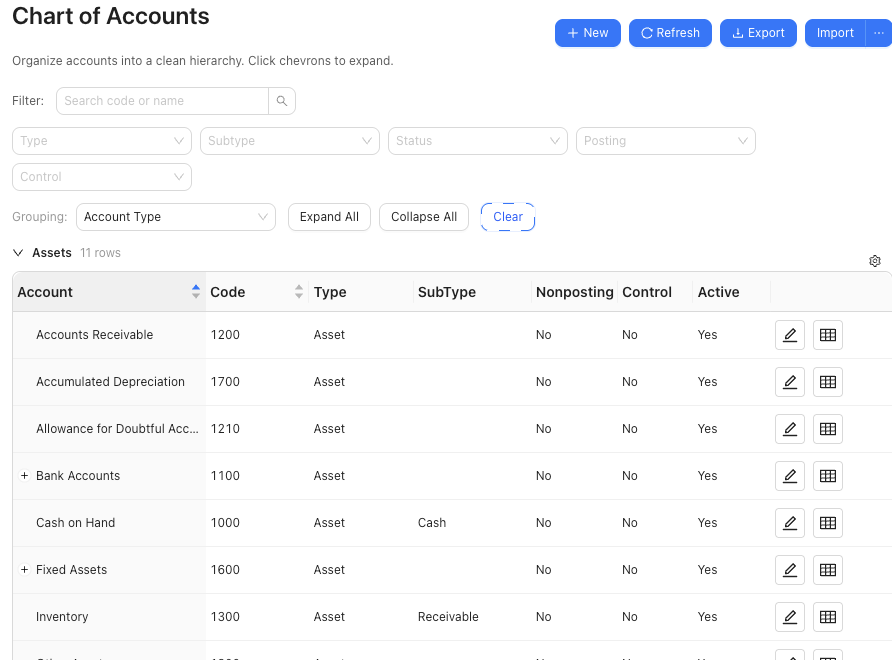
Chart of Accounts. - Review the page header tools:
Newopens the account form.Refreshreloads the list.Exportdownloads the current chart aschart-of-accounts.csv.Importaccepts.csv,.txt,.iif,.xls, or.xlsxfiles.
- Use the search field to find accounts by code or name.
- Use the grouping controls to regroup the list and the expand or collapse controls to change how much of the hierarchy is visible.
- Review the account list structure:
- Accounts are sorted by code.
- Child accounts can be linked by a saved parent account or inferred from account codes when the code structure supports it.
- Filters let you narrow by
Type,Subtype,Status,Posting, andControl. - The list can show
NonpostingandControlcolumns so you can tell why an account is available for structure review but not every posting workflow. - If the company is configured with
Required account fields = Name, account-code columns and code-first labels can disappear from the visible chart and related account pickers.
- Select
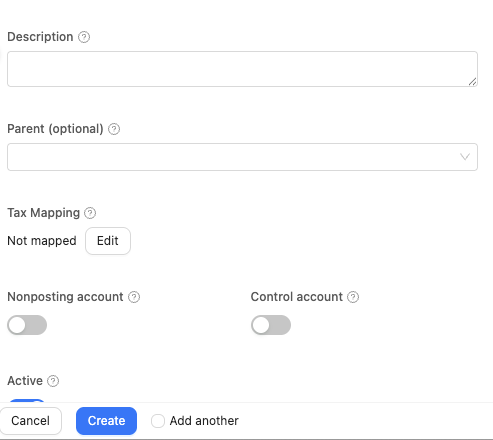
Newor the edit pencil for an existing row when you need to maintain an account record. - When creating or editing an account, fill in the fields SPRK supports publicly:
CodeNameType- optional
Subtype - optional parent account
- optional description, bank number, or notes
Nonposting accountwhen the account is a parent or summary account that should not receive posted activity directlyControl accountwhen the account should be controlled by a subledger or source workflow instead of new manual journal linesReconcile accountwhen an active balance-sheet account should be available for formal reconciliation to a statement or supporting scheduleActive
- If you import chart data, review account-role columns before relying on downstream pickers:
- Spreadsheet-style account imports can map boolean fields such as
Nonposting AccountandControl Account. - Ordinary yes/no or true/false style values map to those switches.
- A QuickBooks account type of
Nonpostingis not the same as SPRK’s account-levelNonposting accountswitch.
- Spreadsheet-style account imports can map boolean fields such as
- Use status carefully:
- Active accounts remain available for normal use.
- Deleting an account from this page sets it inactive instead of removing its history.
What happens next
You can organize the account list into a clearer structure and keep accounts available for downstream workflows.
- These actions change account setup and availability, not existing account balances.
Exportdownloads the current account list.Nonposting accountkeeps a parent or summary account visible in the chart but removes it from posting-oriented account lists unless that page specifically allows nonposting accounts.Control accountmarks an account as subledger controlled and can make it unavailable for new manual journal-entry posting. It is a posting restriction, not an inactive or deleted account.- Name-only account presentation changes how accounts are shown and sorted in supported lists. It does not delete stored account codes or change balances.