
Use the License area to review the current usage table and understand which prompts are informational versus the ones tied to adding more real companies.
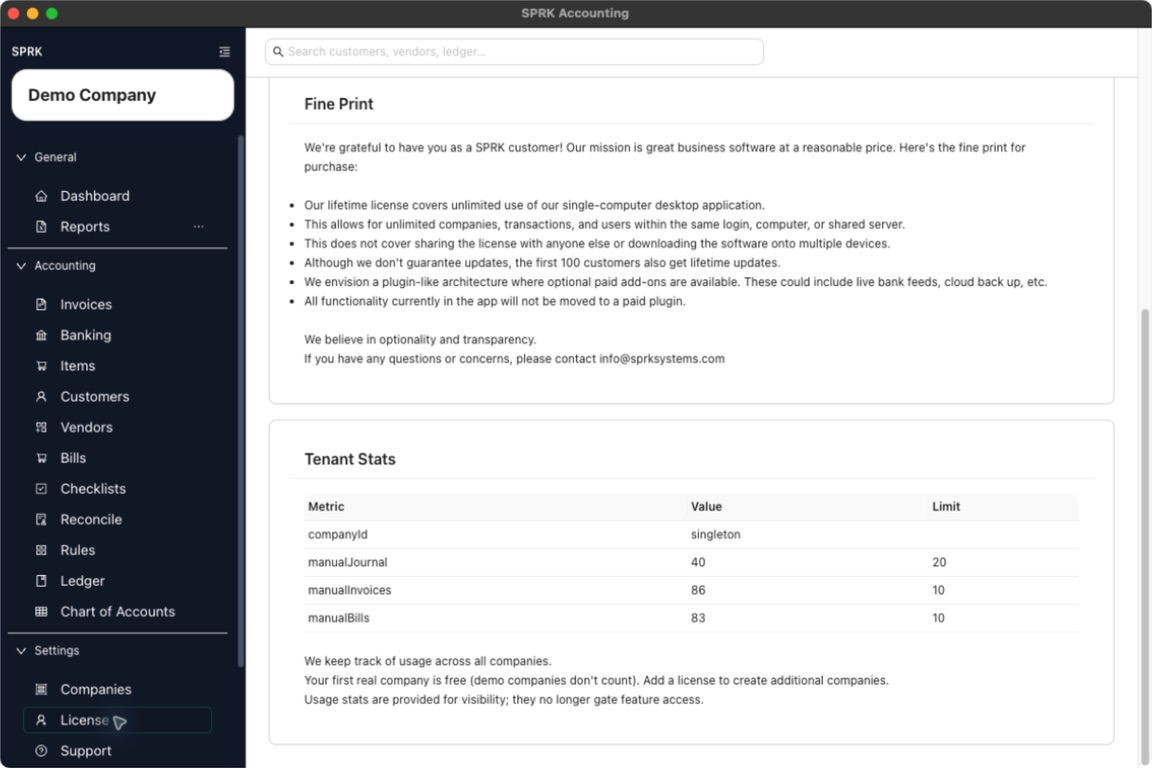
Quick reference
| Item | Meaning | Where It Matters |
|---|---|---|
Tenant Stats |
Workspace-wide usage values shown in the License area. |
Use it to understand current usage context before adding companies. |
Metric |
The usage category SPRK is reporting. | Review it before comparing a value to a limit. |
Value |
The current visible count or usage amount. | Use it to see where the workspace currently stands. |
Limit |
The visible allowance or threshold for that metric. | Use it to understand when a setup action may need a license. |
| First real company note | Explains that the first real company is free and demo companies do not count toward that allowance. | Review it before deciding whether a license is needed for another real company. |
| Upgrade or add-license prompt | A setup message tied most clearly to creating another real company after the free allowance is used. | Use it as an access/setup signal, not as an accounting entry. |
Details
Open License from the System section to review the saved license status, purchase link when shown, fine print, and Tenant Stats table.
Usage values help you understand the current license and company allowance.
License prompts affect setup and access decisions. If you are creating another real company, review the company-creation workflow together with the licensing page.
If something looks wrong
| What You See | What To Check | What To Do Next |
|---|---|---|
| A usage value looks higher than expected | Whether the table is showing workspace-wide usage | Review the metric name and compare it to the visible limit. |
| A limit appears in the table but daily work still opens | Whether the limit applies to setup activity rather than existing accounting workflows | Continue normal work unless SPRK shows a specific prompt for the action you are taking. |
| A company count does not match expectations | Whether demo companies are included in your mental count | Review the free-company note before creating another real company. |
| A license prompt appears during company creation | Whether the workspace has already used the free real-company allowance | Add a license or adjust the setup plan before continuing. |