
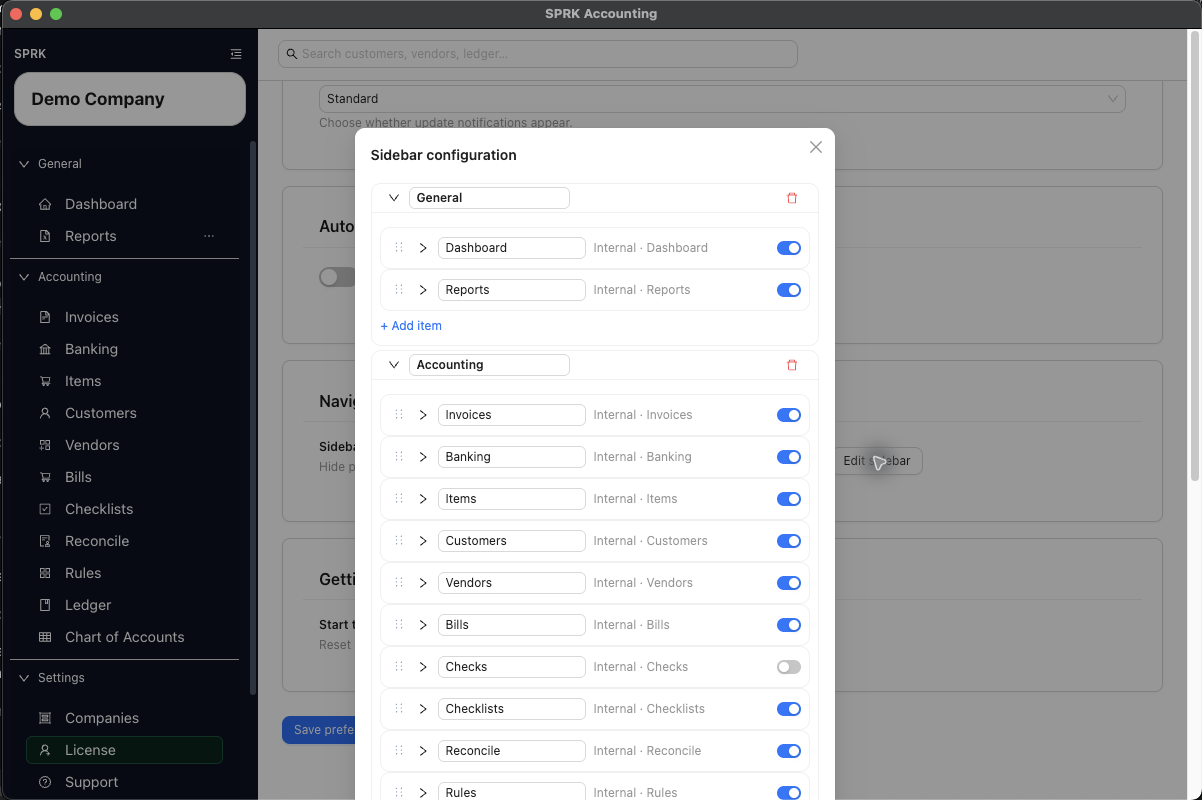
Add Checks to the sidebar when it is hidden, then record and manage checks without losing the posting trail.
When to use this
Use this guide when you need to make the Checks page available in your sidebar, track a check, keep its status current, and connect it to related bank activity during reconciliation work.
Before you start
- You can open
PreferencesifChecksis not already visible in your sidebar. - A bank account exists for the check.
- You know the payee, date, and amount you want to record.
Steps
- If
Checksis not visible in the left sidebar, openPreferences. - In the
Navigationcard, selectEdit sidebar. - Add or show
Checksin the sidebar menu, then save the sidebar configuration. - Return to the sidebar and open
Checks. - Select
New. - Complete the check fields:
Vendor, if you want to reuse a saved vendor record.Bank AccountCheck Number, if usedDatePayeeAmountOffset AccountMemoStatus
- If the selected vendor already has a saved default expense account and
Offset Accountis still blank, review the filled account before you continue. - Save the check as
Draftif it is not ready to post. Save it asIssuedonly when the check should post to the ledger. - Use the row actions later as needed:
Viewto review the recordEditto update a draft or issued checkMatchto connect the check to a bank lineUnmatchto remove that connection when allowedClearto finalize a check that is already matched to a bank transactionVoidto mark the check voidedDeleteto remove a draft check
- Review the
Status,Bank, andMemocolumns in the list after each action. - Use
More>Enable Grid Modewhen several check-list corrections or repeated field updates are easier to review in one table, then review the changed-cell count before selectingApply Changes.
What happens next
Checks is available from the sidebar, and the check is stored so it can move through draft, issued, matched, cleared, voided, or deleted states based on the current workflow.
GL Impact
- Adding or showing
Checksin the sidebar changes only where the page appears in your navigation. - Saving a check as
Draftdoes not post to the ledger. - Saving it as
Issuedposts a journal entry when the check has both aBank Accountand anOffset Account: SPRK debits the offset account and credits the bank account. - A check cannot use an Accounts Payable control account, another bank account, cash account, or credit-card account as its
Offset Account. Use the bill-payment or transfer workflow when that is the accounting event. - After a check has posted, changing protected posting fields requires a correction workflow rather than silently rewriting the entry.
- Matching or unmatching a check links or removes the relationship between the check and a bank transaction. The match action can change operational status, but it does not create its own new journal entry.
Clearrequires an existing matched bank transaction and is separate from the earlierMatchstep. Clearing moves the matched bank row to a confirmed or cleared state instead of acting like delete or void.- Clearing a matched check can reuse an existing linked journal entry, or create one at clear time when the check has an offset account and has not posted yet.
- Confirming a matched bank transaction from the Banking workflow is another downstream path that can post to the general ledger and clear the linked check.
- Voiding a posted issued check reverses its linked journal entry, removes an eligible bank match, and keeps the check as
Voidedhistory. A cleared check cannot be voided from this action. Deleteis available only for an unposted draft. It is not a substitute for voiding an issued check.
If something looks wrong
| What You See | What To Check | What To Do Next |
|---|---|---|
| A bill is already recorded in Accounts Payable | Whether this check is paying that bill | Use Bills > More > Record Payment instead of posting a second expense through Checks |
Void is unavailable |
Whether the check is already Cleared |
Review the reconciliation and use the supported correction path for cleared activity |
Practice and examples
Use the practice file and screenshot to identify where a hidden Checks page can be made visible before check tracking.
- Practice file: check-match-clear-void.csv
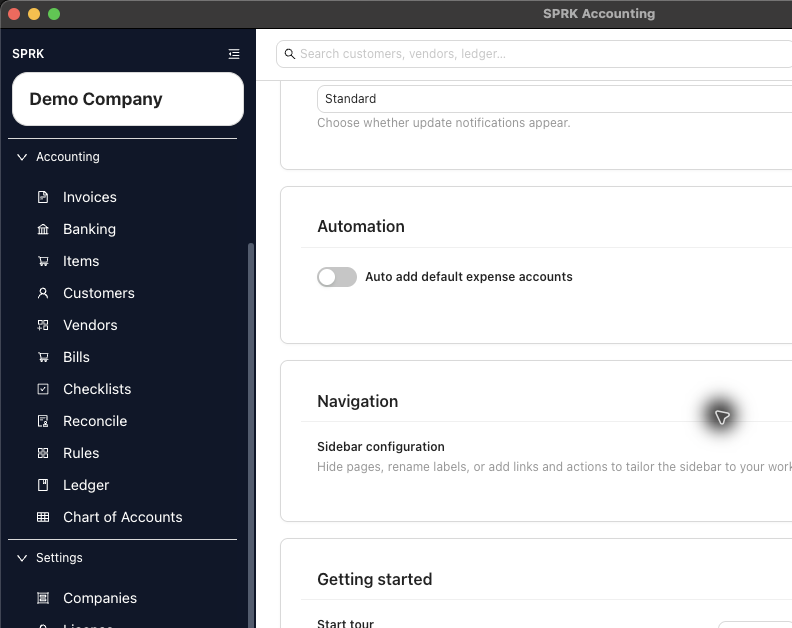
When Checks is hidden, make the page visible from Preferences before managing checks.