
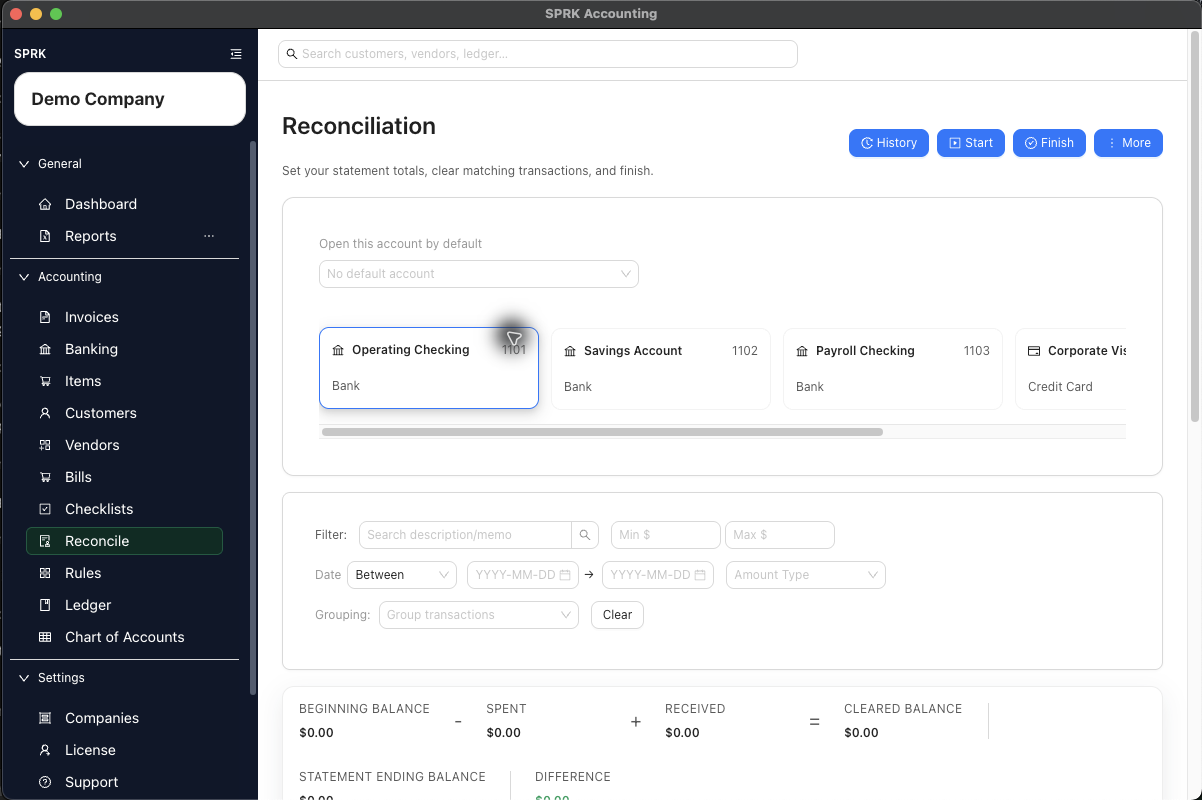
Diagnose the most common reasons a reconciliation cannot start or finish cleanly, including first-time setup issues, date-window issues, and nonzero differences.
When to use this
Use this article when reconciliation stops with a validation error, an unexpected difference, or a transaction-selection problem.
Before you start
- You are working in
Reconcile. - You know which bank or credit card account and statement period you are trying to reconcile.
Steps
- If a bank register has no prior reconciliation, review
How should this account start?:- Choose
Start at $0 — New accountonly when the real account opened at zero. - Choose
Use a Ledger Entry to establish the opening balancewhen the account already had a balance, then select the entry for the same account.
- Choose
- If SPRK says the difference must be zero, compare the summary bar to the statement:
- Remove transactions that do not belong on the statement.
- Add missing confirmed transactions that do belong on the statement.
- Verify the ending balance sign, especially for credit accounts.
- If a transaction is missing from the reconciliation table, confirm that it is:
- In the selected account
- Already confirmed
- Not already reconciled
- Not excluded from bank review
- A row that belongs on the statement you are reconciling
- If the transaction date is after the statement ending date, verify whether the statement actually cleared it in this period before selecting it.
- If a match is wrong, use
Unmatchbefore finishing the reconciliation and choose the correct check again if needed. - If SPRK reports that a transaction is already reconciled, remove it from your current plan and confirm whether it was cleared in an earlier statement period.
- If the transaction coding is wrong and the row has an enabled
Journalaction, open the linked journal entry and reverse it before adding the corrected activity.- If the journal is tied to an invoice or bill, SPRK may ask for source-document confirmation before reversing.
- Recognition postings can require voiding the invoice or bill with the reversal.
- Payment postings can require reversing the payment application so the invoice or bill balance reopens correctly.
- If the confirmed bank row has no journal link, or the link points to the wrong accounting evidence, return to
Banking>Categorizedand useResolvewhere it is visible.- Link only to a reviewed existing GL line.
- Use the create-GL path only when the bank row’s category or split is correct.
- Removing a GL link does not remove the confirmed bank row from reconciliation history.
- If the opening balance looks unexpected, confirm where it came from:
- For a first-time bank-register reconciliation, verify the $0 opening date or the selected opening-balance journal entry, posting date, account line, and amount.
- For another general-ledger account, review the locked opening balance derived from its ledger history.
- For a later reconciliation, compare the current beginning balance to the ending balance on the last posted reconciliation for the same account before the current statement ending date.
- Do not create an extra journal entry just to force the reconciliation beginning balance to change unless the underlying books are actually wrong.
- If a journal create or edit is dated on or before posted reconciliation history for an affected Bank, Cash, or Credit Card account, review both sides of the issue:
- General-ledger reports follow the supported ledger edit, reversal, or correction.
- SPRK shows
Void affected reconciliation?before completing a supported change that would invalidate posted history. Cancelleaves the journal uncommitted.Void and savekeeps each affected session in history with statusVoidedinstead of deleting or recalculating it.- Voided sessions are not used as future reconciliation opening-balance sources, and their released bank rows must be reviewed in the next appropriate period.
- If the wrong first-time bank opening method was selected and it has not been completed, return to
How should this account start?and choose the correct $0 or ledger-entry path. - If the wrong balance is already part of posted reconciliation history, use Common accountant corrections to choose the source-document, journal reversal, or correcting-entry path that matches the accounting error. Then reconcile the correction in the statement period where it belongs.
- If you are finishing a quiet period with no statement-cleared transactions, verify that the beginning and ending balances support a zero-difference reconciliation before posting.
- If a reconciliation report appears blank, confirm that the selected account has a posted reconciliation period. The Reports
Reconciliationtab shows a no-posted-reconciliations message when there is no posted history for the account.
Correcting Historical Opening-Balance Errors
SPRK does not use reconciliation as a separate ledger-adjustment tool. Correct the books only when the underlying accounting is wrong; otherwise, correct the reconciliation setup before posting or preserve the posted reconciliation evidence with a clear explanation of the historical issue.
- Preserve the prior reconciliation report or export that shows the original posted period.
- Identify the source of the beginning balance: the first-time opening-balance journal entry or the prior posted reconciliation ending balance.
- Keep the bank or credit card statement evidence that proves the expected beginning and ending balances.
- Use Common accountant corrections before changing the books, and use Edit linked ledger and bank activity when the issue starts from a reconciled row with a linked journal.
- Include a clear memo, description, or firm workpaper note explaining why the correction was made and which statement period it affects.
- After the correction, review the relevant general-ledger detail, reconciliation history, and bank reconciliation report so the ledger correction and reconciliation evidence can be followed separately.
What happens next
You can identify whether the issue is caused by account selection, transaction status, statement setup, linked journal activity, or the first-time opening balance path.
- Correcting a reconciliation issue usually means adjusting transaction selection, dates, balances, status, exclusion state, or match state before posting the reconcile record.
- Reconciliation beginning balances are carried from the first anchor or prior posted reconciliation history.
- Only posted reconciliation sessions feed later opening balances. A session retained with status
Voidedremains audit history but is excluded from that chain. - If you must change original transaction coding on a row with a linked journal entry, reversing from the linked journal creates a separate reversal entry and then preserves or corrects the bank row based on whether it was already reconciled.
- Confirmed unreconciled rows can appear for review even when their transaction date is after the statement ending date. Select them only when your statement evidence supports that later-dated item clearing in the current period.
Resolvecan repair a confirmed bank row’s GL link, but it is not a reconciliation finish action and does not clear the row by itself.
If something looks wrong
| What You See | What To Check | What To Do Next |
|---|---|---|
A journal save shows Void affected reconciliation? |
The named settlement account, journal date, and affected statement-ending date | Cancel unless the posted session should be retained as Voided; do not treat the warning as a routine save prompt |