
Open the Companies tab to review active and archived companies, refresh the list, and reach creation or maintenance actions.
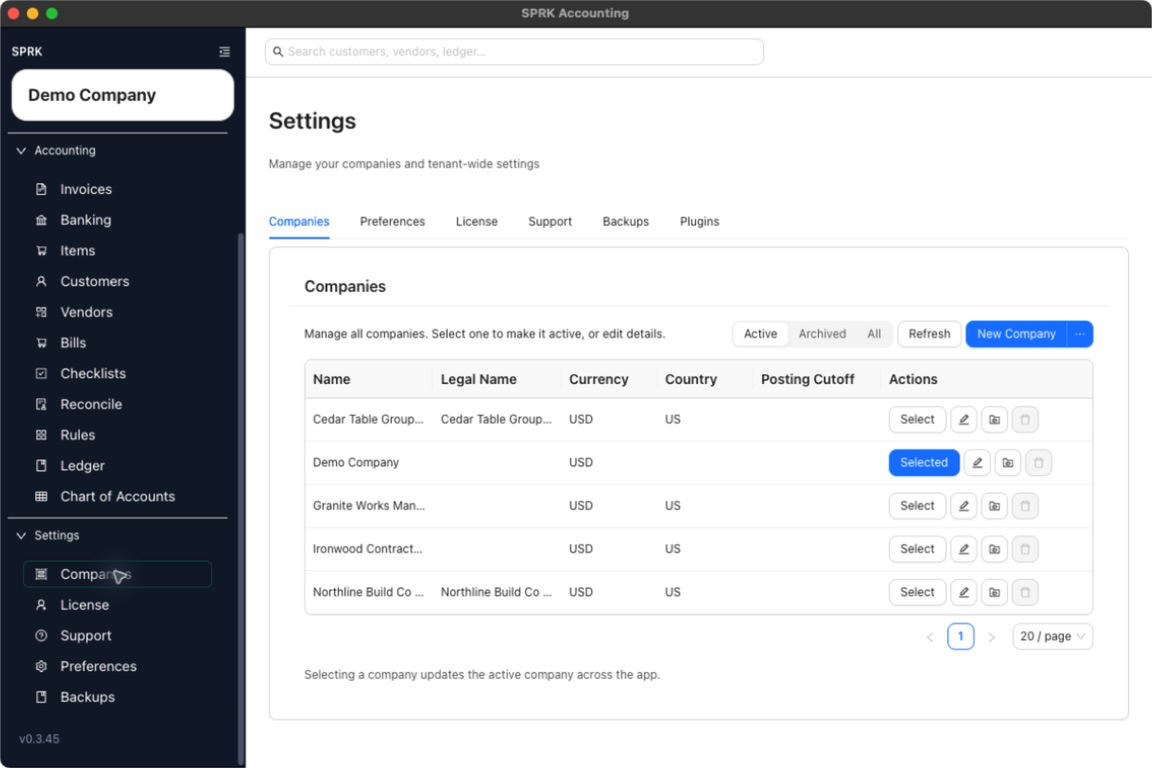
When to use this
Use this guide when you need a central place to review companies and reach the actions for selecting, editing, archiving, deleting, or adding a company.
Before you start
- You are signed in to SPRK.
- At least one company exists in the workspace.
Steps
- Open
Companiesfrom theSystemsection in the sidebar. - Review the company table on the
Companiestab. - Use the filter control to switch between
Active,Archived, andAll. - Select
Refreshif you need to reload the list. - Use
New Companyfor a blank company, or open the menu next to it for import and demo options.- The new-company drawer includes
Required account fieldsandAccounting edit permissionsso admins can review account-code presentation and edit-policy defaults before creating the company.
- The new-company drawer includes
- If your workspace uses tenant-level defaults, open
Defaultsfrom the left sidebar before creating a batch of companies so new company setup starts from the intendedRequired account fields,Journal entries, andReconciliation datespolicies. - Use the row actions to select the active company, edit a company, archive or unarchive it, or permanently delete an archived company.
What happens next
You can see the available company management actions in one place, including the active company marker and company-level action buttons.
- Switching which company is selected changes app context only.