
Import grouped vendor bill rows from a spreadsheet or CSV after reviewing vendor, line, and account-routing details.
When to use this
- You already have grouped vendor bill rows in a spreadsheet or CSV.
- You want SPRK to create bill documents after preview.
- You need to review whether imported bills should stay open or be treated as paid-now.
Before you start
- Confirm the active company.
- Confirm vendors and line accounts are ready for the file.
- Review whether
Pay fromshould route each bill to Accounts Payable or a settlement account. - Keep the original file available until import results have been reviewed.
Steps
- Open the bill import path from
Bills. - Choose the bill file.
- Review the preview before confirming.
- Check grouped document fields such as:
Vendor NameDue DateAccount IDMemoStatusTermsCurrencyTax TotalAmountLine Amount
- Review account-routing headers when the file includes them:
Pay fromDefault Expense AccountLine Account
- Confirm that each bill has a vendor, at least one line, valid line account details, positive quantities, and a non-duplicate bill number.
- Confirm the import only after warnings and routing choices have been reviewed.
What Happens When You Import
SPRK creates bill documents from grouped rows after preview. Pay from follows the same routing rule as the bill drawer: an Accounts Payable control account keeps the imported bill on the accrual path, while a non-control cash, bank, or credit-card settlement account imports as paid-now. Default Expense Account fills blank line accounts; Line Account remains the posting source of truth.
Imports that try to mix payables control routing and settlement-account routing for the same bill are rejected instead of silently guessing the posting path.
If something looks wrong
| What You See | What To Check | What To Do Next |
|---|---|---|
| The preview does not group lines as expected | Bill number, vendor, and line fields | Fix the file before confirming |
| The file leaves a vendor unresolved | Vendor name or vendor identifier in the file | Add or correct the vendor before import |
| A bill routes as paid-now | The Pay from account |
Use an Accounts Payable control account when the bill should remain open |
| A line posts to the wrong account | Line Account and fallback Default Expense Account |
Correct the account values before confirming |
| The import reports duplicate bill numbers | Existing bill numbers and file bill numbers | Resolve duplicate numbers before confirming |
Practice and examples
- Practice file: bill-import-grouped-lines.csv
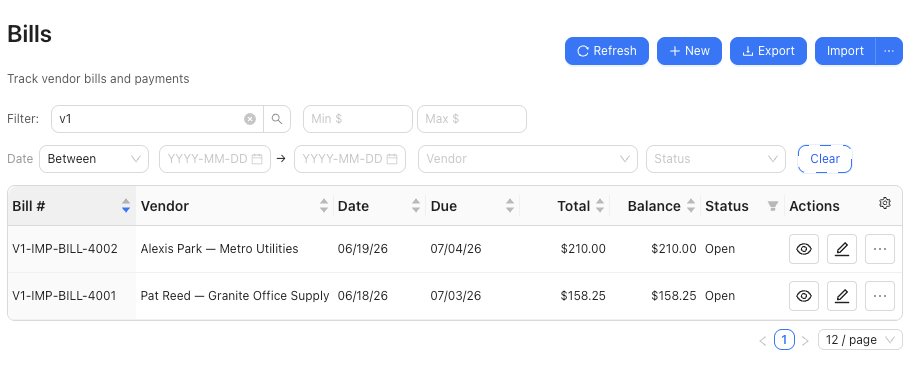
The grouped-line import example shows open bills created from bill-import-grouped-lines.csv.