
Collect the right details and contact support when you need help recovering company data.
When to use this
Use this page when you need help with backup recovery, cannot find an expected restore option, or need to explain which backup or Company File action was used.
Do this first
- Confirm the active company shown in the sidebar.
- Open
Preferences. - Select the
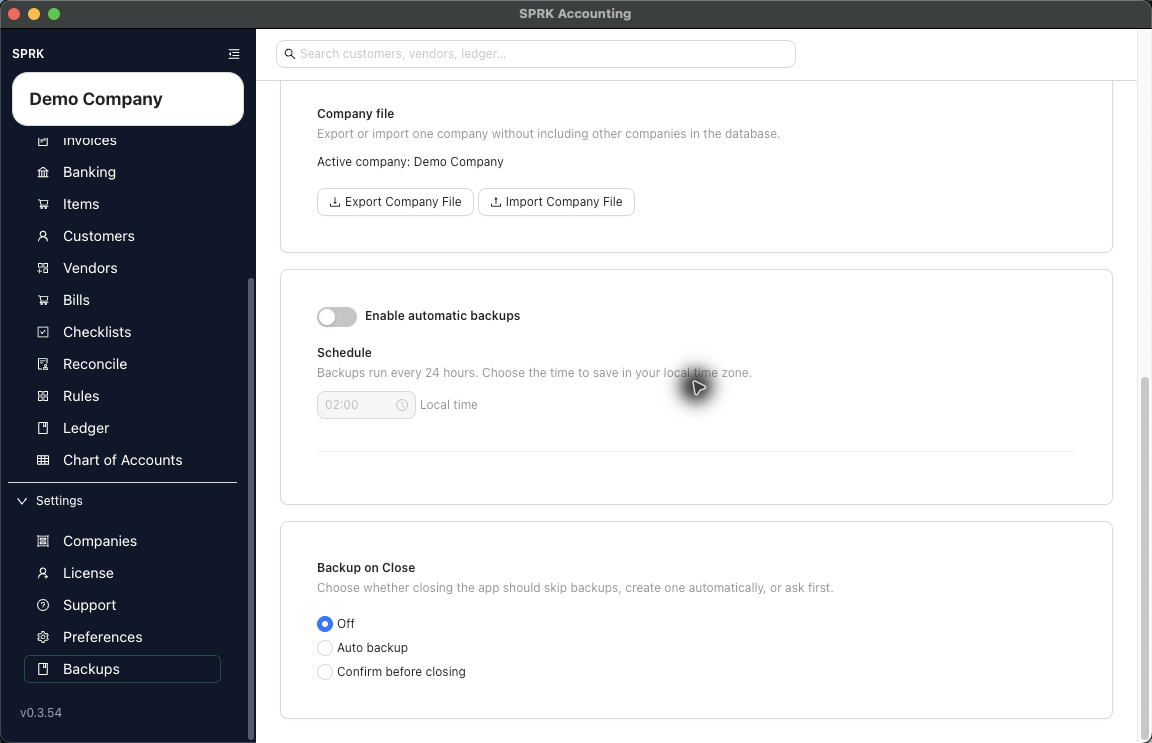
Backupstab. - Review the visible controls: automatic backup switch, schedule, backup location, status,
Run Backup Now,Export Company File, andImport Company File. - Keep routine backups separate from Company File transfer work:
Run Backup Nowcreates an on-demand backup file.Export Company Fileexports the active company.Import Company Filestarts a company-file import path.
- Review the latest visible backup status before changing settings or importing a file.
- If no restore control is visible for the recovery question, collect the details below before contacting support.
Details to capture
- Company name.
- Backup setting or Company File action involved.
- Backup location value shown in SPRK.
- Latest visible backup status and time.
- Whether the location shown after a manual backup differs from the saved setting.
- Name of the Company File package if import or export is involved.
- Visible error message or prompt.
- Screenshot of the
Backupstab if it does not expose sensitive client data.
What to avoid
- Do not import a Company File into the wrong company context.
- Do not repeat imports or backup actions just to force a recovery result.
- Do not treat a routine backup file and a Company File package as interchangeable.
- Do not describe a support recovery request as complete until the SPRK or support process confirms the result.
If something looks wrong
| What You See | What To Check | What To Do Next |
|---|---|---|
| The expected restore option is not visible | Whether the Backups tab shows only backup, export, and import controls |
Collect recovery details before contacting support. |
| A saved backup location is relative | Whether a recent manual backup result shows the resolved location | Capture both values before changing the setting. |
| A Company File import is being considered for recovery | Whether the package and target company are correct | Review the Company File import preview before confirming. |
| Backup status shows an error | The status message, backup location, and active company | Capture the message and contact support if the path or result is unclear. |
| Existing company data could be affected | Whether the next action imports, replaces, or changes company data | Stop and review the related Company File workflow before continuing. |