
Choose the supported invoice correction path before changing a posted, paid, or void-sensitive invoice.
When to use this
- An invoice needs correction after it has moved beyond simple draft entry.
- You need to decide whether to edit, receive or reverse payment, void, or review linked journals.
- You need to preserve invoice and posting history while correcting the customer record.
Before you start
- Confirm the active company and invoice number.
- Review invoice status, total, balance, due date, and payment history.
- Review linked journal entries before changing a posted invoice.
- If the invoice has active payments, use
More→View linked journal entries, open the payment journal, selectReverse, and confirmReverse payment applicationfirst.
Steps
- Open
Invoices. - Find the invoice.
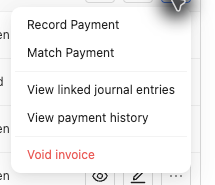
- Review the row action menu and choose the visible action that matches the correction:
- Use
Editfor supported field changes. - Use
Record PaymentorMatch Paymentfor payment activity. - Use
View payment historyorView linked journal entrieswhen you need review before changing the invoice. - Use
Void invoiceonly when it is visible on an eligible posted-like invoice row.
- Use
- For an eligible unpaid open invoice, confirm the invoice is
Openand its full balance still equals its total. - Do not use the void path for draft, partial, paid, or already voided invoices.
- In
Void invoice, chooseToday,Original invoice date, orCustom date. - Enter a non-empty reason.
- Confirm only when you intend SPRK to post a reversal, set the invoice to
Void, zero the invoice balance, and preserve void audit details.
What Happens When You Void or Correct
Void invoice preserves the original invoice and posts reversal history instead of deleting the record. Posted invoice edits follow the posted-save strategy SPRK shows before saving. Payment corrections belong in the payment workflow before the invoice recognition posting can be reversed.
If something looks wrong
| What You See | What To Check | What To Do Next |
|---|---|---|
Void invoice is not available |
Invoice status, balance, and active payments | Use the visible correction action or clear required payment activity first |
| The invoice has active payments | Payment history and linked journal entries | Reverse the payment journal and confirm Reverse payment application before voiding recognition |
| A draft invoice needs removal | Whether the invoice has posted ledger impact | Use the draft action available for that invoice instead of a void workflow |
| A posted edit prompt appears | The posted-save strategy and date choices | Choose the strategy that matches the intended correction |
| The correction would duplicate another adjustment | Existing linked journals and payment history | Stop and review the source workflow before confirming |