
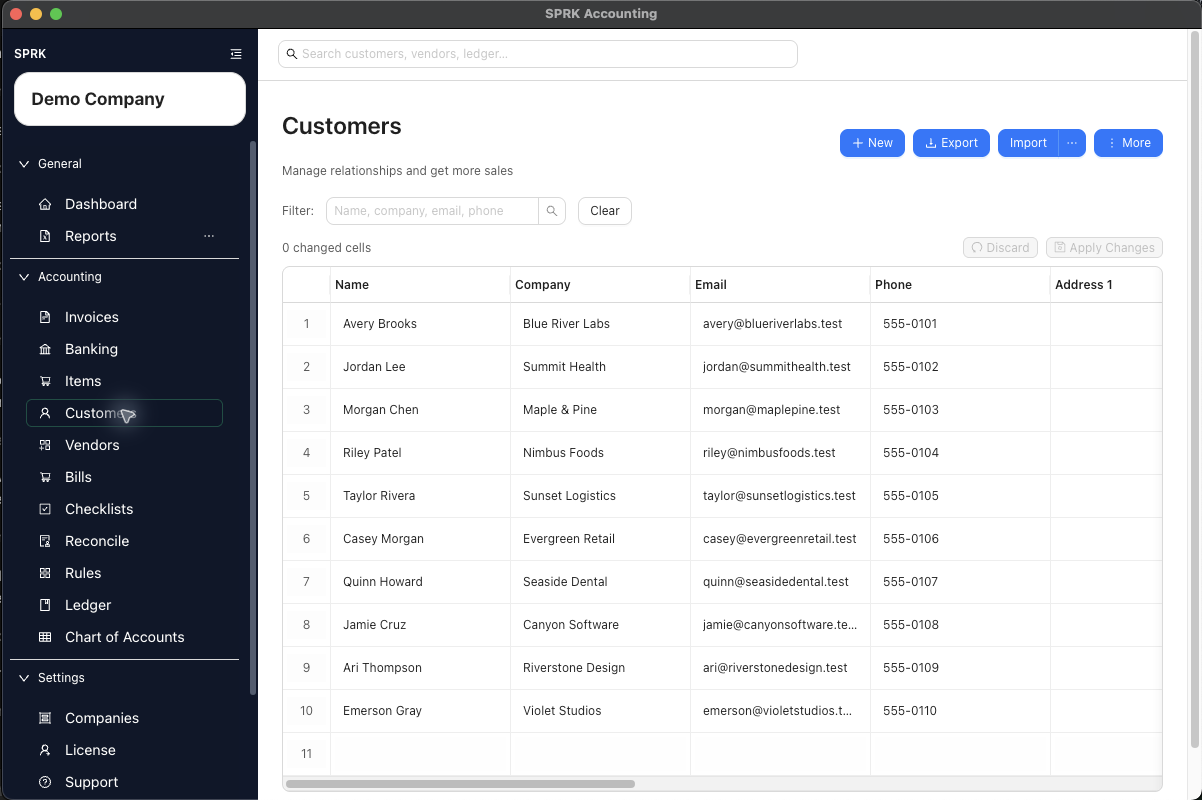
Create and maintain customer records so invoicing, payment follow-up, and customer-specific receivables workflows start from clean setup data.
When to use this
Use this guide when you need to add, update, search, import, or review customer records before creating invoices, receiving customer payments, or assigning customer context to money-in bank activity.
Before you start
- You can open the
Customerspage. - You know the customer name.
- If you plan to use customer defaults for invoicing, you know the income account, payment terms, or credit settings you want to apply.
- You understand whether this customer should use standard terms, restricted credit handling, or manual review before invoicing.
Steps
- Open
Customers. - Decide how you want to work with the list:
- Use
Newto add one customer from the drawer. - Use
Importif you already have customer data in a spreadsheet or CSV file. - Use
More>Enable Grid Modeif you want to make several edits in one pass, or turn onGrid Edit defaultinPreferencesif you want supported pages to open that way automatically.
- Use
- When creating or editing a single customer, complete the core record details:
Nameis required.Company,Email, andPhonesupport billing and follow-up workflows.- Address fields help complete the customer profile when you need them.
- If you want invoices for this customer to start from a consistent sales setup, set
Default Income Account. - If you track customer payment expectations, open
Payments & Creditand review the available settings:Credit limitCredit statusTerms
- Decide whether this customer needs setup beyond the basic record:
- Keep the record simple if you only need contact details.
- Add payment terms when invoices should usually follow a standard due-date pattern.
- Add credit settings when your team wants a visible review signal before opening new invoices.
- Save the customer.
- Use the page tools to manage or review the list after setup:
- Search by name, company, email, or phone.
- Filter for
ActiveorInactivecustomers when cleaning up the list. - Open row actions for an existing customer when you want to create an invoice, create a payment, or jump into that customer’s
AR Agingreport.
- If the customer will be invoiced often, pair this setup with saved item records and invoice account review before the first live invoice.
- In Banking, customer names can also help money-in review:
- Pending bank rows can offer customer choices alongside vendor choices where the current UI exposes grouped parties.
- Banking import preview can resolve
Customer,Customer ID, or sharedCustomer/Vendorstyle columns for inflow or sale rows. Add unknown customers (n)creates setup records from unique unresolved customer names in the current import preview batch when you choose to use it.
- When importing customers from QuickBooks Desktop data, review billing address fields after import.
- QuickBooks-style
BADDR1throughBADDR5values can be preserved as structured billing address data. - SPRK can place the first billing line into address line 1, keep remaining non-city lines in address line 2, and parse a final
City, ST ZIPline into city, state, and postal code when it is recognizable. - Review any address that does not follow that pattern before using it on customer-facing invoices.
- QuickBooks-style
- Use Grid Edit when post-import cleanup or repeated customer-field updates will be faster than opening one drawer at a time, then review the changed-cell count before selecting
Apply Changes.
What happens next
The customer is saved and available for invoice selection, payment workflows, Banking party assignment, search, import cleanup, and customer-specific receivables follow-up.
Assigning a customer to a bank row adds party context. It is not the same as matching the bank row to an open invoice payment; use the Banking match workflow when the row should receive an invoice payment.
If something looks wrong
| What You See | What To Check | What To Do Next |
|---|---|---|
| Two similar workflows or fields are easy to mix up | Treating Credit status as a payment record |
It is a setup signal, not the same thing as receiving money |