
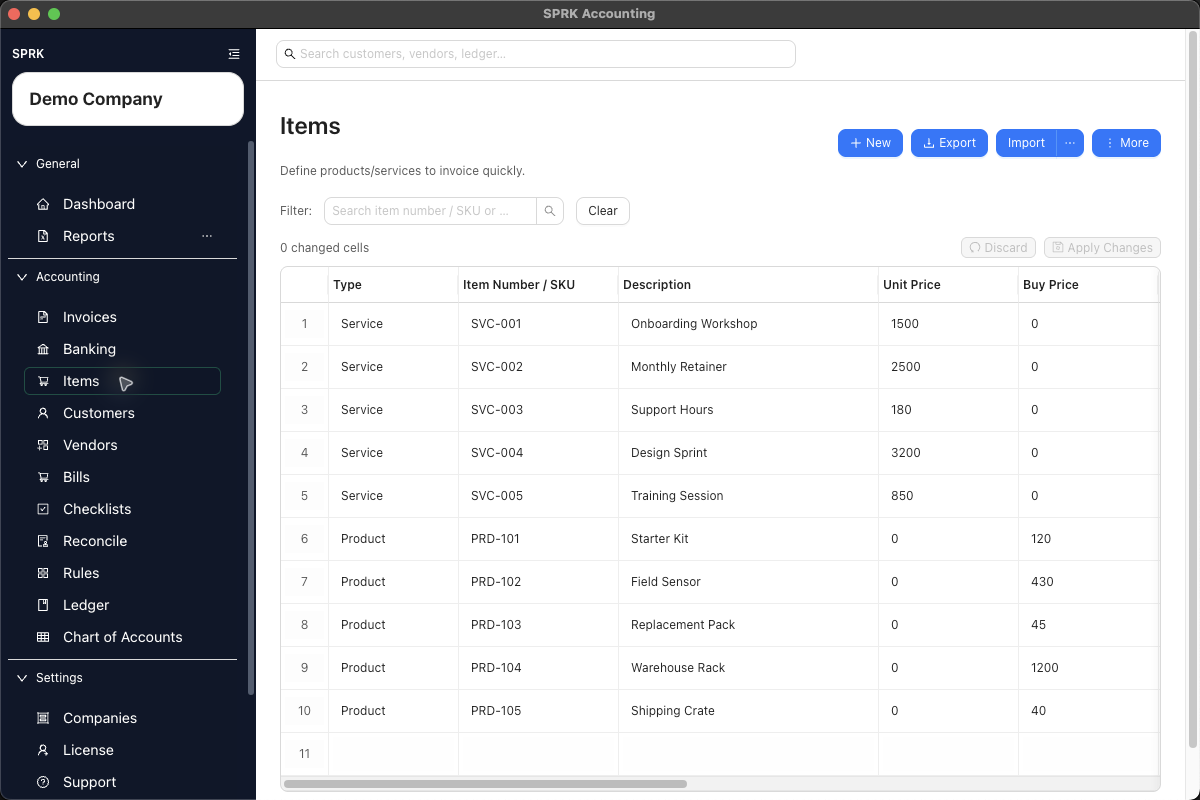
Define reusable products and services so invoice and bill lines can be built faster and with more consistent descriptions, pricing, and account defaults.
When to use this
Use this guide when you want invoice lines to reuse prepared item records instead of retyping descriptions, prices, and sales defaults each time.
Before you start
- You can open the
Itemspage. - You know whether the record should be set up as a service, product, or other item type.
- You know whether the company should show items as
Item number + descriptionorDescription only.
Steps
- Open
Items. - Choose the setup path that fits the job:
- Use
Newto create one item from the drawer. - Use
Importif you already maintain item data in a spreadsheet or CSV file. - Use
More>Enable Grid Modewhen you need to edit several items together, or turn onGrid Edit defaultinPreferencesif you want supported pages to open that way automatically.
- Use
- Enter the core item details:
Item typeItem Number / SKUDescriptionUnit priceUnit of measure
- Fill in the extra pricing and tax fields when they matter for your workflow:
Buy priceSell priceTax code
- If your accounting setup uses account defaults, review:
Income accountis the income account credited when the item is used on an invoice.Expense/COGS accountis an optional default for the item’s cost side.
- Confirm the
Activesetting, then save the item. - If you import items, review any mapped income or expense accounts before you rely on those records in invoices.
- Use the page search when you need to find an item later by item number, SKU, or description.
- Use the saved item later from invoice line selectors so invoice entry stays more consistent.
- Use item row actions when you want to start a document directly from an item:
Create Invoiceopens an invoice drawer with the selected item ready for invoice-line review.Create Billopens a bill drawer with the selected item ready for bill-line review where that workflow is available.- Review the customer or vendor, account, price or cost, quantity, tax, and status before saving. The shortcut starts the document; it does not post it by itself.
- Use Grid Edit when repeated item cleanup will be faster than opening each record individually, then review the changed-cell count before selecting
Apply Changes.
Item Identification Mode
Company setup can control how supported item labels appear:
Item number + descriptionshows item numbers beside descriptions where the current workflow supports it.Description onlyhides item numbers from supported item selectors, invoice drawers, and line-entry helpers.
This is a presentation setting. It does not delete the item number from the item record, change the item’s income or expense accounts, or change posting behavior.
Items And Inventory
Choosing Product as the Item type or filling in Expense/COGS account does not, by itself, create inventory quantities, an inventory asset balance, or automatic cost-of-goods-sold entries. The item stores reusable invoice or bill defaults. If you track inventory outside SPRK, use your accountant’s approved journal and supporting schedule rather than assuming the item record is a perpetual inventory system.
What happens next
The item becomes available for invoice entry, item-started invoices or bills where available, and future lines can reuse its saved description, pricing, unit-of-measure, and account defaults.
If something looks wrong
| What You See | What To Check | What To Do Next |
|---|---|---|
| An item exists, but no invoice has posted | Whether you have created and opened an invoice using the item | Item setup supplies defaults; the invoice workflow creates the receivable and income posting |
| An item number is hidden | The company Item identification mode |
Choose Item number + description if your team wants item numbers displayed |
| Inventory quantities or asset balances are missing | Whether you expected Product or Expense/COGS account to turn on inventory accounting |
Maintain the approved inventory schedule and entries separately |