
Bring bank or credit card activity into SPRK from a supported file, review the preview, and load selected rows into the Pending tab for bank review.
When to use this
- You have bank or credit card activity from an outside file and want to review it in SPRK.
- You want imported rows to enter
Pendingbefore they are categorized and confirmed. - Imported rows are reviewed before posting. Use Banking review to categorize and confirm them after the import.
Before you start
- The correct active company is selected.
- The destination bank or credit card account exists in SPRK.
- You know which account should receive the imported activity.
- Your file is one of the accepted formats:
.csv,.xlsx,.xlsm,.ofx,.qfx, or.qbo. - You are ready to review duplicate warnings, money direction, skipped rows, and unresolved vendor or customer names before confirming.
- Confirming the import preview can create pending bank rows and, where available, new vendor or customer setup records. General ledger posting happens later when pending rows are confirmed from Banking.
Steps
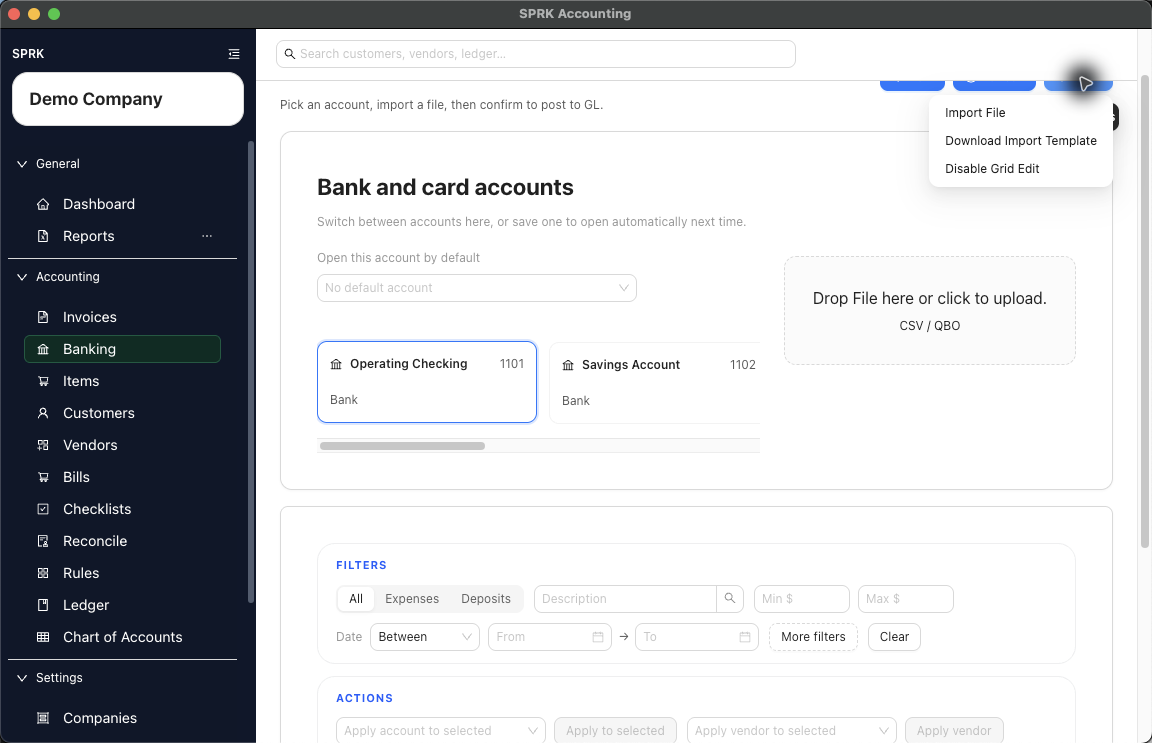
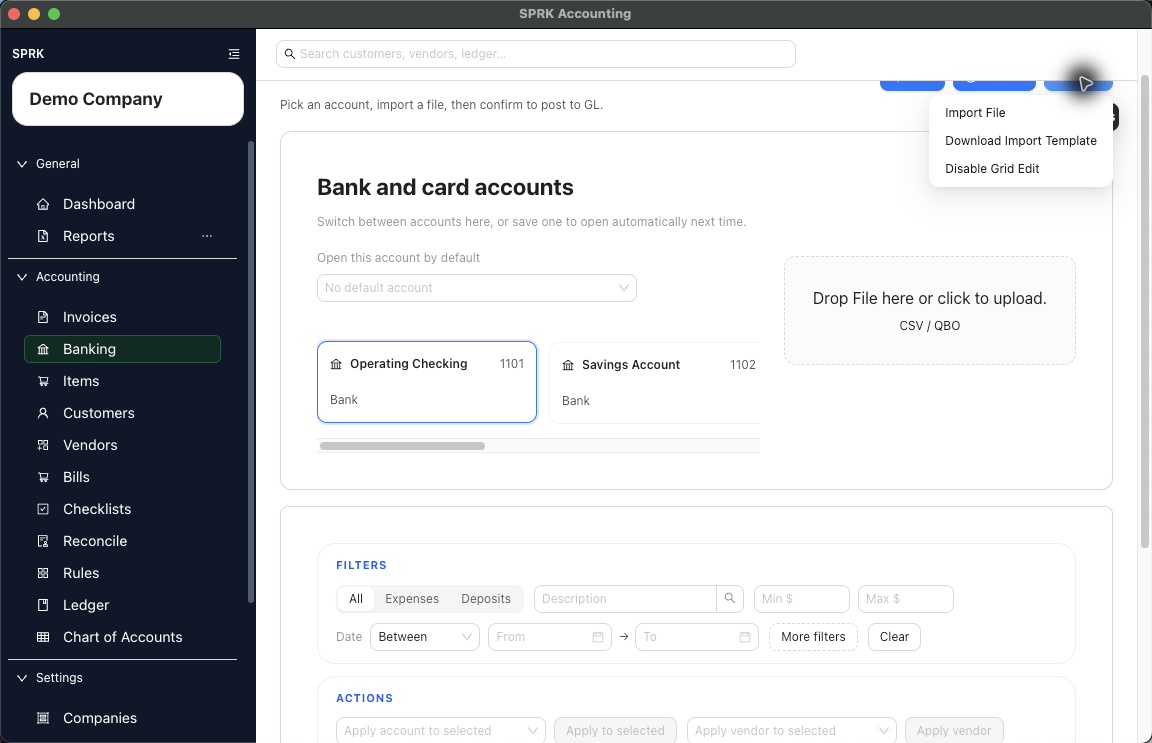
- Open
Banking. - Select the bank or credit card account that should receive the imported activity.
- If no account is selected, SPRK keeps the importer disabled and prompts you to choose an account first.
- If a default account opens automatically, confirm it matches the file you are about to import.
- Open
More->Import File, or use the visible upload area beside the account cards if the file is ready. - In the
Bank Transaction Import Templatemodal, review the file guidance before choosing a file.- Spreadsheet imports require date, description, and amount information.
- Common spreadsheet columns include
Amount,Debit,Credit,Check #,Memo, and vendor or customer names. - If the file includes a direction column such as
Credit or Debit,Debit/Credit,Dr/Cr, orType, SPRK can use that direction to decide whether the row is spent or received. OFX,QFX, andQBOfiles do not use spreadsheet column headers.- Use
More->Download Import Templatewhen you want a starter spreadsheet layout.
- Choose
Import File, then select one supported file. - Review the import preview before confirming.
- Confirm the parsed import type and row counts.
- Confirm how many rows are selected for import.
- Review likely-duplicate warnings against existing bank activity.
- Review
Vendor or Customervalues when the preview shows vendor or customer matching. - Use
Add unknown vendors (n)only for unresolved names that should become vendor records. - Use
Add unknown customers (n)only for unresolved names that should become customer records. - Use row-level
Skipfor rows that should not be imported. UseRestoreif a skipped row should be included after all. - Filter the preview by description, date, or transaction type when you need to inspect a subset of rows.
- If spent and received values look backwards, turn on
Swap spent/receivedbefore confirming the preview. - Confirm the import preview.
- Return to the
Pendingtab for the selected account. - Review, categorize, and confirm the imported transactions you want posted to the general ledger.
What Happens When You Import
The confirmed preview loads selected, non-skipped rows into the selected account’s pending bank register.
- Creating vendors or customers from the preview updates setup records and the current preview batch.
- Confirming the import preview creates or updates pending bank rows for later review.
- Pending rows affect the general ledger only after they are categorized and confirmed from the Banking workflow.
Optional practice files are available for duplicate review and vendor or customer review.
If something looks wrong
| What You See | What To Check | What To Do Next |
|---|---|---|
Import File is disabled |
Whether a bank or credit card account is selected | Select the destination account, then open the import action again. |
| The preview shows likely duplicates | Date, amount, description, account, and existing bank activity | Skip rows that are already present; keep only rows that should enter Pending. |
| A vendor or customer name remains unresolved | Whether the name should become a new setup record | Use Add unknown vendors (n) or Add unknown customers (n) only for names you want to create. |
| Spent and received values appear reversed | Whether the file uses signed amounts, debit/credit columns, or a supported direction column | Turn on Swap spent/received before confirming the preview if the direction is wrong. |
Rows are missing from Pending after import |
Whether they were skipped or filtered out in the preview | Reopen the source file and import only the rows that should be restored. |
| Imported rows do not appear in reports yet | Whether the rows are still in Pending |
Categorize and confirm the rows from Banking before expecting ledger reports to change. |
| The wrong account received the pending rows | Which account was selected before confirmation | Stop and review the affected pending rows before confirming or correcting activity. |